PDS4 Mars Reconnainssance Orbiter Mission Dictionary User’s Guide
2024-09-16
Jennifer Ward
Introduction
Purpose of this User’s Guide
This User’s Guide provides an overview of the MRO Mission Data Dictionary. It details how to include the dictionary in a PDS4 label, describes the organization of classes and attributes, provides definitions of the classes and attributes, and lists examples of labels that use it.
Audience
This User’s Guide should be useful to data providers intending to archive MRO data with PDS as well as PDS Nodes who are working with these data providers.
Overview of the MRO Mission Data Dictionary
The MRO Mission Data Dictionary contains classes, attributes, and rules specific to the MRO mission and its instruments. Steward: Jennifer Ward, PDS Geosciences Node, geosci@wunder.wustl.edu
How to Include the MRO Mission Data Dictionary in a PDS4 Label
The dictionary consists of a set of files with names in the form PDS4_MRO_xxxx_yyyy.ext, where
xxxx = the PDS4 Information Model version, e.g. 1I00
yyyy = the MRO Mission Dictionary version, e.g. 1300
and the file extensions are
.csv = A comma-separated value table of dictionary attributes
.JSON = The dictionary contents in JSON format
.sch = The dictionary “rules” as an XML Schematron file
.txt = The report generated when the dictionary was built
.xml = The PDS4 label that describes this set of files
.xsd = The dictionary contents as an XML schema file
Only the schema and Schematron files are needed for validating a PDS4 label.
The latest version of this dictionary may be found on the PDS web site at https://pds.nasa.gov/datastandards/dictionaries/index-missions.shtml#mro.
The following is an example showing the use of this dictionary in a PDS4 label.
   <?xml version="1.0" encoding="UTF-8"?>
   <?xml-model href="https://pds.nasa.gov/pds4/pds/v1/PDS4_PDS_1I00.sch" schematypens="http://purl.oclc.org/dsdl/schematron"?>
   <?xml-model href="https://pds.nasa.gov/pds4/mission/mro/v1/PDS4_MRO_1I00_1300.sch" schematypens="http://purl.oclc.org/dsdl/schematron"?>
   <Product_Observational xmlns="http://pds.nasa.gov/pds4/pds/v1"
       xmlns:mro="http://pds.nasa.gov/pds4/mission/mro/v1"
       xmlns:xsi="http://www.w3.org/2001/XMLSchema-instance"
       xsi:schemaLocation="http://pds.nasa.gov/pds4/pds/v1           https://pds.nasa.gov/pds4/pds/v1/PDS4_PDS_1I00.xsd
                           http://pds.nasa.gov/pds4/mission/mro/v1   https://pds.nasa.gov/pds4/mission/mro/v1/PDS4_MRO_1I00_1300.xsd">
The following is an example showing the location of the MRO dictionary classes and attributes in a PDS4 label.
<Observation_Area>
    ...
    <Mission_Area>
      <mro:MRO_Parameters>
        <mro:product_type>
        <mro:product_version_id>
        <mro:release_id>
        <mro:observation_rationale>
        <mro:orbit_number>
        <mro:mission_phase_name>
        <mro:spacecraft_clock_count_partition>
        <mro:spacecraft_clock_start_count>
        <mro:spacecraft_clock_stop_count>
        <mro:producer_institution_name>
        <mro.HiRISE_Time_Parameters>
            ...
        <mro.HiRISE_Instrument_Setting_Parameters>
            ...
        <mro.HiRISE_Temperature_Parameters>
            ...
        <mro.HiRISE_Power_Parameters>
            ...
        <mro.HiRISE_RDR_Parameters>
            ...
        <mro:CRISM_Parameters>
            ...
        <mro:SHARAD_Parameters>
            ...
        <mro:CRISM_ATO_Parameters>
            ...
The namespace for the MRO Mission Dictionary is http://pds.nasa.gov/pds4/mission/mro/v1, abbreviated “mro:”.
Organization of Classes and Attributes
See the schematic for a visual representation of the classes and attributes.
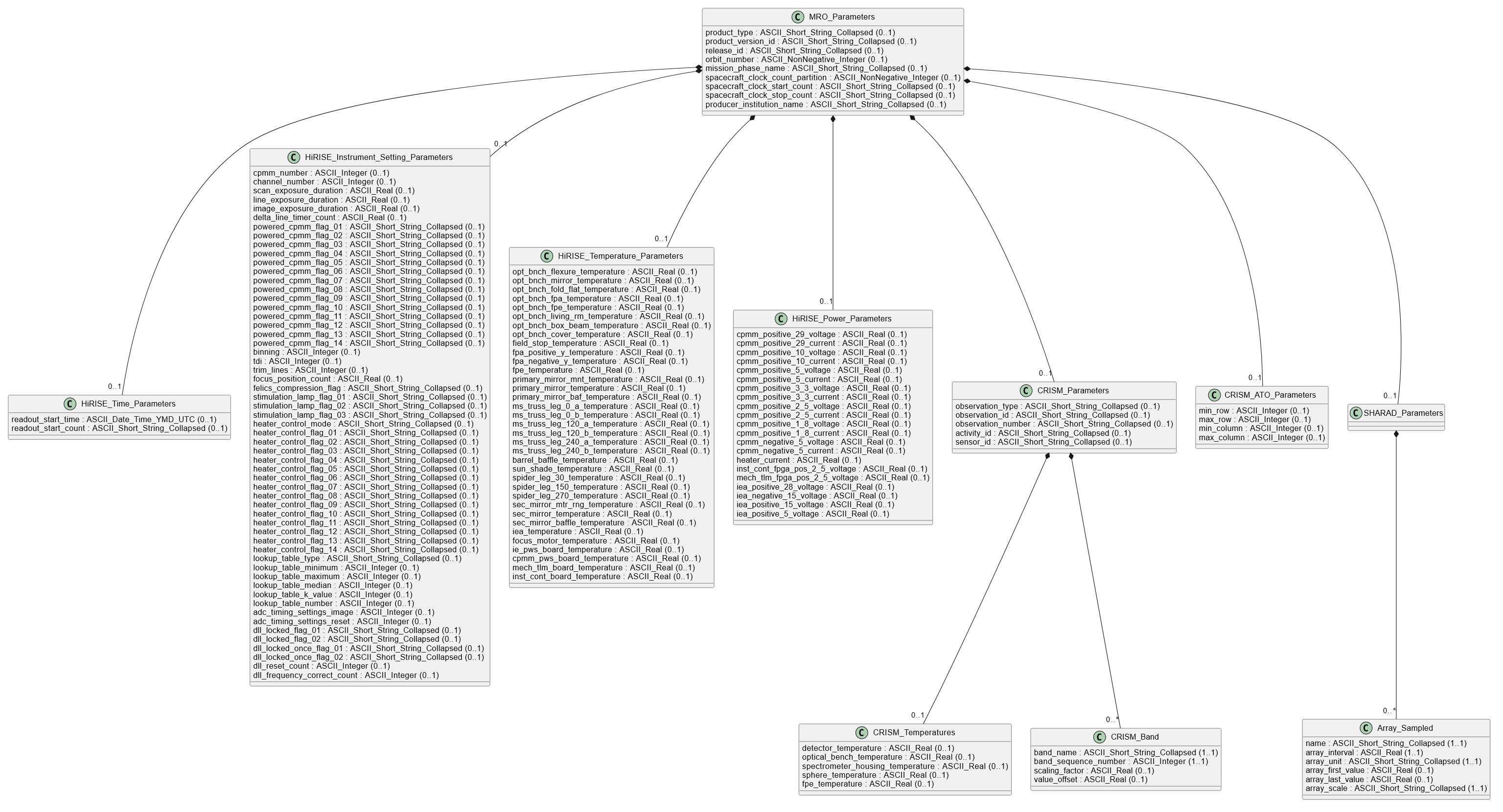
Below is a list showing the hierarchy of classes in order of appearance in the PDS4 label. See the Definitions section for complete definitions.
MRO_Parameters class
HiRISE_Time_Parameters class
HiRISE_Instrument_Setting_Parameters class
HiRISE_Temperature_Parameters class
HiRISE_Power_Parameters class
HiRISE_RDR_Parameters class
CRISM_Parameters class
CRISM_Temperatures subclass
CRISM_Band subclass
SHARAD_Parameters class
SHARAD_Observation_Parameters
Array_Sampled subclass
CRISM_ATO_Parameters class
Below are lists showing the hierarchy of class attributes in order of appearance in the PDS4 label. See the Definitions section for complete definitions.
MRO_Parameters Class
product_type
product_version_id
release_id
observation_rationale
orbit_number
mission_phase_name
spacecraft_clock_count_partition
spacecraft_clock_start_count
spacecraft_clock_stop_count
producer_institution_name
line_prefix_bytes
line_suffix_bytes
HiRISE_Time_Parameters
HiRISE_Instrument_Setting_Parameters
HiRISE_Temperature_Parameters
HiRISE_Power_Parameters
HiRISE_RDR_Parameters
CRISM_Parameters
SHARAD_Parameters
CRISM_ATO_Parameters
HiRISE_Time_Parameters Class
observation_start_time
readout_start_time
readout_start_count
analog_power_start_time
analog_power_start_count
calibration_start_time
calibration_start_count
HiRISE_Instrument_Setting_Parameters Class
cpmm_number
channel_number
scan_exposure_duration
line_exposure_duration
image_exposure_duration
delta_line_timer_count
powered_cpmm_flag_00
powered_cpmm_flag_01
powered_cpmm_flag_02
powered_cpmm_flag_03
powered_cpmm_flag_04
powered_cpmm_flag_05
powered_cpmm_flag_06
powered_cpmm_flag_07
powered_cpmm_flag_08
powered_cpmm_flag_09
powered_cpmm_flag_10
powered_cpmm_flag_11
powered_cpmm_flag_12
powered_cpmm_flag_13
binning
tdi
trim_lines
focus_position_count
felics_compression_flag
stimulation_lamp_flag_red
stimulation_lamp_flag_blg
stimulation_lamp_flag_nir
heater_control_mode
heater_control_flag_00
heater_control_flag_01
heater_control_flag_02
heater_control_flag_03
heater_control_flag_04
heater_control_flag_05
heater_control_flag_06
heater_control_flag_07
heater_control_flag_08
heater_control_flag_09
heater_control_flag_10
heater_control_flag_11
heater_control_flag_12
heater_control_flag_13
lookup_table_type
lookup_table_minimum
lookup_table_maximum
lookup_table_median
lookup_table_k_value
lookup_table_number
adc_timing_settings_image
adc_timing_settings_reset
dll_locked_flag_01
dll_locked_flag_02
dll_locked_once_flag_01
dll_locked_once_flag_02
dll_reset_count
dll_frequency_correct_count
HiRISE_Temperature_Parameters Class
opt_bnch_flexure_temperature
opt_bnch_mirror_temperature
opt_bnch_fold_flat_temperature
opt_bnch_fpa_temperature
opt_bnch_fpe_temperature
opt_bnch_living_rm_temperature
opt_bnch_box_beam_temperature
opt_bnch_cover_temperature
field_stop_temperature
fpa_positive_y_temperature
fpa_negative_y_temperature
fpe_temperature
primary_mirror_mnt_temperature
primary_mirror_temperature
primary_mirror_baf_temperature
ms_truss_leg_0_a_temperature
ms_truss_leg_0_b_temperature
ms_truss_leg_120_a_temperature
ms_truss_leg_120_b_temperature
ms_truss_leg_240_a_temperature
ms_truss_leg_240_b_temperature
barrel_baffle_temperature
sun_shade_temperature
spider_leg_30_temperature
spider_leg_150_temperature
spider_leg_270_temperature
sec_mirror_mtr_rng_temperature
sec_mirror_temperature
sec_mirror_baffle_temperature
iea_temperature
focus_motor_temperature
ie_pws_board_temperature
cpmm_pws_board_temperature
mech_tlm_board_temperature
inst_cont_board_temperature
HiRISE_Power_Parameters Class
cpmm_positive_29_voltage
cpmm_positive_29_current
cpmm_positive_10_voltage
cpmm_positive_10_current
cpmm_positive_5_voltage
cpmm_positive_5_current
cpmm_positive_3_3_voltage
cpmm_positive_3_3_current
cpmm_positive_2_5_voltage
cpmm_positive_2_5_current
cpmm_positive_1_8_voltage
cpmm_positive_1_8_current
cpmm_negative_5_voltage
cpmm_negative_5_current
heater_current
inst_cont_fpga_pos_2_5_voltage
mech_tlm_fpga_pos_2_5_voltage
iea_positive_28_voltage
iea_negative_15_voltage
iea_positive_15_voltage
iea_positive_5_voltage
HiRISE_RDR_Parameters Class
ccd_flag_red0
ccd_flag_red1
ccd_flag_red2
ccd_flag_red3
ccd_flag_red4
ccd_flag_red5
ccd_flag_red6
ccd_flag_red7
ccd_flag_red8
ccd_flag_red9
ccd_flag_ir10
ccd_flag_ir11
ccd_flag_bg12
ccd_flag_bg13
binning_red0
binning_red1
binning_red2
binning_red3
binning_red4
binning_red5
binning_red6
binning_red7
binning_red8
binning_red9
binning_ir10
binning_ir11
binning_bg12
binning_bg13
tdi_red0
tdi_red1
tdi_red2
tdi_red3
tdi_red4
tdi_red5
tdi_red6
tdi_red7
tdi_red8
tdi_red9
tdi_ir10
tdi_ir11
tdi_bg12
tdi_bg13
special_processing_flag_red0
special_processing_flag_red1
special_processing_flag_red2
special_processing_flag_red3
special_processing_flag_red4
special_processing_flag_red5
special_processing_flag_red6
special_processing_flag_red7
special_processing_flag_red8
special_processing_flag_red9
special_processing_flag_ir10
special_processing_flag_ir11
special_processing_flag_bg12
special_processing_flag_bg13
minimum_stretch
maximum_stretch
CRISM_Parameters Class
observation_type
observation_id
observation_number
activity_id
sensor_id
CRISM_Temperatures
CRISM_Band
CRISM_Temperatures Class
detector_temperature
optical_bench_temperature
spectrometer_housing_temperature
sphere_temperature
fpe_temperature
CRISM_Band Class
band_name
band_sequence_number
scaling_factor
value_offset
CRISM_ATO_Parameters Class
ato.min_line
ato.max_line
ato.min_sample
ato.max_sample
Definitions
Classes (in alphabetical order)
Array_Sampled
The Array_Sampled class class provides parameters for a uniformly sampled array.
Minimum occurrences: 0
Maximum occurrences: *
CRISM_ATO_Parameters
The CRISM_ATO_Parameters class is the container for observation parameters specific to the CRISM ATO (Along-Track Oversampled) reprocessing project..
Minimum occurrences: 0
Maximum occurrences: 1
CRISM_Band
The CRISM_Band class contains parameters describing a single band in CRISM Browse Product 3D image array or in the CRISM data cube containing refined spectral summary parameters..
Minimum occurrences: 0
Maximum occurrences: *
CRISM_Parameters
The CRISM_Parameters class is the container for CRISM-specific observation parameters.
Minimum occurrences: 0
Maximum occurrences: 1
CRISM_Temperatures
The CRISM_Temperatures class is the container for CRISM-specific temperature-related parameters.
Minimum occurrences: 0
Maximum occurrences: 1
HiRISE_Instrument_Setting_Parameters
The HiRISE_Instrument_Setting_Parameters class contains attributes specific to HiRISE EDRs.
Minimum occurrences: 0
Maximum occurrences: 1
HiRISE_Power_Parameters
The HiRISE_Power_Parameters class contains attributes specific to HiRISE EDRs.
Minimum occurrences: 0
Maximum occurrences: 1
HiRISE_RDR_Parameters
The HiRISE_RDR_Parameters class contains attributes specific to HiRISE RDRs.
Minimum occurrences: 0
Maximum occurrences: 1
HiRISE_Temperature_Parameters
The HiRISE_Temperature_Parameters class contains attributes specific to HiRISE EDRs.
Minimum occurrences: 0
Maximum occurrences: 1
HiRISE_Time_Parameters
The HiRISE_Time_Parameters class contains attributes specific to HiRISE EDRs.
Minimum occurrences: 0
Maximum occurrences: 1
MRO_Parameters
The MRO_Parameters class is the container for mission-specific metadata elements.
Minimum occurrences: 0
Maximum occurrences: 1
SHARAD_Observation_Parameters
The SHARAD_Observation_Parameters class class provides parameters for SHARAD radar observations.
Minimum occurrences: 0
Maximum occurrences: *
SHARAD_Parameters
The SHARAD_Parameters class contains attributes specific to SHARAD data.
Minimum occurrences: 0
Maximum occurrences: 1
Attributes (in alphabetical order)
activity_id The activity_id attribute describes the type of measurement contained in a CRISM EDR or other data product, and provides indication of how the observation is commanded. The format of the value is AC### where AC is a 2-letter designation of the type of measurement made, and ### is a 3-numeral designation of the instrument command macro that was executed to acquire the data. Macro numbers are in the range 0-255. For EDRs, BI is measurement of detector bias, DF is a measurement of background including dark current and thermal background, LP is measurement of a focal plane lamp, SP is measurement of the internal integrating sphere, and SC is measurement of an external scene. TP indicates that the EDR contains any test pattern produced by instrument electronics. T1 through T7 specify the test pattern, test pattern 1 through test pattern 7. UN indicates that the EDR contains data in which housekeeping does not match the commanded instrument configuration. For an RDR, RA indicates that the file contains values in units of radiance (W m^-2 nm^-1 sr^-1). IF indicates that the file contains values in units of I/F, or radiance divided by solar flux scaled for heliocentric distance. AL indicates that the file contains values as estimated Labert albedo, which is I/F corrected for cosine of incidence angle and for atmospheric and thermal effects. SU indicates that the files contains summary parameters, unitless values derived from Lambert albedo. For an RDR or a DDR, DE indicates that the files contains derived values related to observation geometry or independently characterized properties of the scene.
PDS4 data type: ASCII_Short_String_Collapsed
Valid values: N/A
Minimum occurrences: 0
Maximum occurrences: 1
Nillable: No
adc_timing_settings_image adc_timing_settings_image attribute provides the HiRISE Channel 0 analog-to-digital conversion timing settings for the readout of the video waveform.
PDS4 data type: ASCII_Integer
Valid values: 4, 5, 6
4 - 4
5 - 5
6 - 6
Minimum occurrences: 0
Maximum occurrences: 1
Nillable: No
adc_timing_settings_reset adc_timing_settings_reset attribute provides the HiRISE Channel 0 analog-to-digital conversion timing settings for the reset of the video waveform.
PDS4 data type: ASCII_Integer
Valid values: 4, 5, 6
4 - 4
5 - 5
6 - 6
Minimum occurrences: 0
Maximum occurrences: 1
Nillable: No
analog_power_start_count The analog_power_start_count attribute provides the spacecraft clock count when power to the CPMM units was applied.
PDS4 data type: ASCII_Short_String_Collapsed
Valid values: N/A
Minimum occurrences: 0
Maximum occurrences: 1
Nillable: No
analog_power_start_time The analog_power_start_time attribute provides the UTC time when power to the CPMM units was applied.
PDS4 data type: ASCII_Date_Time_YMD_UTC
Valid values: N/A
Minimum occurrences: 0
Maximum occurrences: 1
Nillable: No
array_first_value The array_first_value element provides the first value in an ascending series and is therefore the minimum value at which a given data item was sampled.
PDS4 data type: ASCII_Real
Valid values: N/A
Minimum occurrences: 0
Maximum occurrences: 1
Nillable: No
array_interval The array_interval attribute provides the spacing of points at which data are sampled and at which values for an instrument or other parameter are available. If x1 and xn are the first and last sampling parameter values, respectively, xn is larger than x1, n is the number of sampling parameters, the caret symbol (^) denotes exponentiation, and b, a positive real number, is the base for exponentiation, then the value of sampling_parameter_interval is: (xn-x1)/(n-1) (for sampling_parameter_scale = Linear), (xn/x1)^(1/(n-1)) (for sampling_parameter_scale = Logarithmic), (b^xn-b^x1)/(n-1) (for sampling_parameter_scale = Exponential).
PDS4 data type: ASCII_Real
Valid values: N/A
Minimum occurrences: 1
Maximum occurrences: 1
Nillable: No
array_last_value The array_last_value element provides the last value in an ascending series and is therefore the maximum value at which a given data item was sampled.
PDS4 data type: ASCII_Real
Valid values: N/A
Minimum occurrences: 0
Maximum occurrences: 1
Nillable: No
array_scale The array_scale attribute specifies whether the sampling interval is linear or something other such as logarithmic.
PDS4 data type: ASCII_Short_String_Collapsed
Valid values: Linear, Exponential, Logarithmic
Linear - Values of Uniformly Sampled are given at uniform (linear) spacings of an independent variable - for example, 1, 2, 3, 4, …
Exponential - The values of the independent variable in exponential uniformly sampled data are given at uniform spacing of the exponential of some base b, a positive real number. That is, for independent variable x in the range [x1, xn], the sampling points xj satisfy: b^xj = b^x1 + (j-1)(b^xn - b^x1)/(n-1) for j = 1 … n where the caret symbol (^) denotes exponentiation. For example, if the independent variable has values 0., 0.30103, 0.47712, 0.60206, … and the base is 10, then the Exponential Uniformly Spaced data are given at 10^0., 10^0.30103, 10^0.47712, 10^0.60206, … or 1, 2, 3, 4, …
Logarithmic - The values of the independent variable, x, in logarithmic uniformly sampled data are given at uniform spacing of the logarithm of x in some base, b, a positive real number. That is, for independent variable x in the range [x1, xn], the sampling points xj satisfy: log_b(xj) = log_b(x1) + (j-1)(log_b(xn) - log_b(x1))/(n-1) for j = 1 … n where log_b(x) is the log of x in base b. For example, if the independent variable has values 1, 10, 100, 1000, … and the base is 10, then the Logarithmic Uniformly Spaced data are given at 0, 1, 2, 3 …
Minimum occurrences: 1
Maximum occurrences: 1
Nillable: No
array_unit The array_unit element specifies the unit of measure of associated data sampling parameters.
PDS4 data type: ASCII_Short_String_Collapsed
Valid values: N/A
Minimum occurrences: 1
Maximum occurrences: 1
Nillable: No
azimuth_processing_window The windowing function used to reduce sidelobes resulting from azimuth (along-track) synthetic aperture processing of the raw echo records. All radargrams in the SHARAD radargram archive use a Hann function.
PDS4 data type: ASCII_Short_String_Collapsed
Valid values: N/A
Minimum occurrences: 1
Maximum occurrences: 1
Nillable: No
band_name Identifies the name of the CRISM band associated with the specific scaling and offset parameters used in a CRISM browse product.
PDS4 data type: ASCII_Short_String_Collapsed
Valid values: N/A
Minimum occurrences: 1
Maximum occurrences: 1
Nillable: No
band_sequence_number Defines the order of the CRISM bands along the Axis_Array when axis_name is band.
PDS4 data type: ASCII_Integer
Valid values: N/A
Minimum occurrences: 1
Maximum occurrences: 1
Nillable: No
Minimum value: 1
barrel_baffle_temperature The barrel_baffle_temperature attribute provides the temperature of the HiRISE instrument’s barrel baffle in degrees Centigrade. See Figure 2.3, MRO HiRISE EDR SIS, REFKEYID JPLD-32004.
PDS4 data type: ASCII_Real
Valid values: N/A
Minimum occurrences: 0
Maximum occurrences: 1
Nillable: No
Unit of measure type: Units_of_Temperature
Specified unit id: C
binning binning element provides the HiRISE observation binning mode; i.e., the number of lines binned in an observation. mro:line_exposure_duration = mro:binning * mro:scan_line_duration
PDS4 data type: ASCII_Integer
Valid values: 1, 2, 3, 4, 8, 16
1 - bin 1
2 - bin 2
3 - bin 3
4 - bin 4
8 - bin 8
16 - bin 16
Minimum occurrences: 0
Maximum occurrences: 1
Nillable: No
binning_bg12 The binning element provides the HiRISE observation binning mode; i.e., the number of lines binned in an observation. mro:line_exposure_duration = mro:binning * mro:scan_line_duration
PDS4 data type: ASCII_Integer
Valid values: 1, 2, 3, 4, 8, 16
1 - bin 1
2 - bin 2
3 - bin 3
4 - bin 4
8 - bin 8
16 - bin 16
Minimum occurrences: 0
Maximum occurrences: 1
Nillable: Yes
binning_bg13 The binning element provides the HiRISE observation binning mode; i.e., the number of lines binned in an observation. mro:line_exposure_duration = mro:binning * mro:scan_line_duration
PDS4 data type: ASCII_Integer
Valid values: 1, 2, 3, 4, 8, 16
1 - bin 1
2 - bin 2
3 - bin 3
4 - bin 4
8 - bin 8
16 - bin 16
Minimum occurrences: 0
Maximum occurrences: 1
Nillable: Yes
binning_ir10 The binning element provides the HiRISE observation binning mode; i.e., the number of lines binned in an observation. mro:line_exposure_duration = mro:binning * mro:scan_line_duration
PDS4 data type: ASCII_Integer
Valid values: 1, 2, 3, 4, 8, 16
1 - bin 1
2 - bin 2
3 - bin 3
4 - bin 4
8 - bin 8
16 - bin 16
Minimum occurrences: 0
Maximum occurrences: 1
Nillable: Yes
binning_ir11 The binning element provides the HiRISE observation binning mode; i.e., the number of lines binned in an observation. mro:line_exposure_duration = mro:binning * mro:scan_line_duration
PDS4 data type: ASCII_Integer
Valid values: 1, 2, 3, 4, 8, 16
1 - bin 1
2 - bin 2
3 - bin 3
4 - bin 4
8 - bin 8
16 - bin 16
Minimum occurrences: 0
Maximum occurrences: 1
Nillable: Yes
binning_red0 The binning element provides the HiRISE observation binning mode; i.e., the number of lines binned in an observation. mro:line_exposure_duration = mro:binning * mro:scan_line_duration
PDS4 data type: ASCII_Integer
Valid values: 1, 2, 3, 4, 8, 16
1 - bin 1
2 - bin 2
3 - bin 3
4 - bin 4
8 - bin 8
16 - bin 16
Minimum occurrences: 0
Maximum occurrences: 1
Nillable: Yes
binning_red1 The binning element provides the HiRISE observation binning mode; i.e., the number of lines binned in an observation. mro:line_exposure_duration = mro:binning * mro:scan_line_duration
PDS4 data type: ASCII_Integer
Valid values: 1, 2, 3, 4, 8, 16
1 - bin 1
2 - bin 2
3 - bin 3
4 - bin 4
8 - bin 8
16 - bin 16
Minimum occurrences: 0
Maximum occurrences: 1
Nillable: Yes
binning_red2 The binning element provides the HiRISE observation binning mode; i.e., the number of lines binned in an observation. mro:line_exposure_duration = mro:binning * mro:scan_line_duration
PDS4 data type: ASCII_Integer
Valid values: 1, 2, 3, 4, 8, 16
1 - bin 1
2 - bin 2
3 - bin 3
4 - bin 4
8 - bin 8
16 - bin 16
Minimum occurrences: 0
Maximum occurrences: 1
Nillable: Yes
binning_red3 The binning element provides the HiRISE observation binning mode; i.e., the number of lines binned in an observation. mro:line_exposure_duration = mro:binning * mro:scan_line_duration
PDS4 data type: ASCII_Integer
Valid values: 1, 2, 3, 4, 8, 16
1 - bin 1
2 - bin 2
3 - bin 3
4 - bin 4
8 - bin 8
16 - bin 16
Minimum occurrences: 0
Maximum occurrences: 1
Nillable: Yes
binning_red4 The binning element provides the HiRISE observation binning mode; i.e., the number of lines binned in an observation. mro:line_exposure_duration = mro:binning * mro:scan_line_duration
PDS4 data type: ASCII_Integer
Valid values: 1, 2, 3, 4, 8, 16
1 - bin 1
2 - bin 2
3 - bin 3
4 - bin 4
8 - bin 8
16 - bin 16
Minimum occurrences: 0
Maximum occurrences: 1
Nillable: Yes
binning_red5 The binning element provides the HiRISE observation binning mode; i.e., the number of lines binned in an observation. mro:line_exposure_duration = mro:binning * mro:scan_line_duration
PDS4 data type: ASCII_Integer
Valid values: 1, 2, 3, 4, 8, 16
1 - bin 1
2 - bin 2
3 - bin 3
4 - bin 4
8 - bin 8
16 - bin 16
Minimum occurrences: 0
Maximum occurrences: 1
Nillable: Yes
binning_red6 The binning element provides the HiRISE observation binning mode; i.e., the number of lines binned in an observation. mro:line_exposure_duration = mro:binning * mro:scan_line_duration
PDS4 data type: ASCII_Integer
Valid values: 1, 2, 3, 4, 8, 16
1 - bin 1
2 - bin 2
3 - bin 3
4 - bin 4
8 - bin 8
16 - bin 16
Minimum occurrences: 0
Maximum occurrences: 1
Nillable: Yes
binning_red7 The binning element provides the HiRISE observation binning mode; i.e., the number of lines binned in an observation. mro:line_exposure_duration = mro:binning * mro:scan_line_duration
PDS4 data type: ASCII_Integer
Valid values: 1, 2, 3, 4, 8, 16
1 - bin 1
2 - bin 2
3 - bin 3
4 - bin 4
8 - bin 8
16 - bin 16
Minimum occurrences: 0
Maximum occurrences: 1
Nillable: Yes
binning_red8 The binning element provides the HiRISE observation binning mode; i.e., the number of lines binned in an observation. mro:line_exposure_duration = mro:binning * mro:scan_line_duration
PDS4 data type: ASCII_Integer
Valid values: 1, 2, 3, 4, 8, 16
1 - bin 1
2 - bin 2
3 - bin 3
4 - bin 4
8 - bin 8
16 - bin 16
Minimum occurrences: 0
Maximum occurrences: 1
Nillable: Yes
binning_red9 The binning element provides the HiRISE observation binning mode; i.e., the number of lines binned in an observation. mro:line_exposure_duration = mro:binning * mro:scan_line_duration
PDS4 data type: ASCII_Integer
Valid values: 1, 2, 3, 4, 8, 16
1 - bin 1
2 - bin 2
3 - bin 3
4 - bin 4
8 - bin 8
16 - bin 16
Minimum occurrences: 0
Maximum occurrences: 1
Nillable: Yes
calibration_start_count The calibration_start_count attribute provides the spacecraft clock count at the beginning of the first calibration image line.
PDS4 data type: ASCII_Short_String_Collapsed
Valid values: N/A
Minimum occurrences: 0
Maximum occurrences: 1
Nillable: No
calibration_start_time The calibration_start_time attribute provides the UTC time at the beginning of the first calibration image line.
PDS4 data type: ASCII_Date_Time_YMD_UTC
Valid values: N/A
Minimum occurrences: 0
Maximum occurrences: 1
Nillable: No
ccd_flag_bg12 The ccd_flag elements identify which CCDs were operating at the time of an observation. There is a special processing flag for each CCD used in the observation.
PDS4 data type: ASCII_Short_String_Collapsed
Valid values: ON, OFF
ON - the CCD was actively acquiring data during the observation.
OFF - the CCD was turned off during the observation.
Minimum occurrences: 0
Maximum occurrences: 1
Nillable: No
ccd_flag_bg13 The ccd_flag elements identify which CCDs were operating at the time of an observation. There is a special processing flag for each CCD used in the observation.
PDS4 data type: ASCII_Short_String_Collapsed
Valid values: ON, OFF
ON - the CCD was actively acquiring data during the observation.
OFF - the CCD was turned off during the observation.
Minimum occurrences: 0
Maximum occurrences: 1
Nillable: No
ccd_flag_ir10 The ccd_flag elements identify which CCDs were operating at the time of an observation. There is a special processing flag for each CCD used in the observation.
PDS4 data type: ASCII_Short_String_Collapsed
Valid values: ON, OFF
ON - the CCD was actively acquiring data during the observation.
OFF - the CCD was turned off during the observation.
Minimum occurrences: 0
Maximum occurrences: 1
Nillable: No
ccd_flag_ir11 The ccd_flag elements identify which CCDs were operating at the time of an observation. There is a special processing flag for each CCD used in the observation.
PDS4 data type: ASCII_Short_String_Collapsed
Valid values: ON, OFF
ON - the CCD was actively acquiring data during the observation.
OFF - the CCD was turned off during the observation.
Minimum occurrences: 0
Maximum occurrences: 1
Nillable: No
ccd_flag_red0 The ccd_flag elements identify which CCDs were operating at the time of an observation. There is a special processing flag for each CCD used in the observation.
PDS4 data type: ASCII_Short_String_Collapsed
Valid values: ON, OFF
ON - the CCD was actively acquiring data during the observation.
OFF - the CCD was turned off during the observation.
Minimum occurrences: 0
Maximum occurrences: 1
Nillable: No
ccd_flag_red1 The ccd_flag elements identify which CCDs were operating at the time of an observation. There is a special processing flag for each CCD used in the observation.
PDS4 data type: ASCII_Short_String_Collapsed
Valid values: ON, OFF
ON - the CCD was actively acquiring data during the observation.
OFF - the CCD was turned off during the observation.
Minimum occurrences: 0
Maximum occurrences: 1
Nillable: No
ccd_flag_red2 The ccd_flag elements identify which CCDs were operating at the time of an observation. There is a special processing flag for each CCD used in the observation.
PDS4 data type: ASCII_Short_String_Collapsed
Valid values: ON, OFF
ON - the CCD was actively acquiring data during the observation.
OFF - the CCD was turned off during the observation.
Minimum occurrences: 0
Maximum occurrences: 1
Nillable: No
ccd_flag_red3 The ccd_flag elements identify which CCDs were operating at the time of an observation. There is a special processing flag for each CCD used in the observation.
PDS4 data type: ASCII_Short_String_Collapsed
Valid values: ON, OFF
ON - the CCD was actively acquiring data during the observation.
OFF - the CCD was turned off during the observation.
Minimum occurrences: 0
Maximum occurrences: 1
Nillable: No
ccd_flag_red4 The ccd_flag elements identify which CCDs were operating at the time of an observation. There is a special processing flag for each CCD used in the observation.
PDS4 data type: ASCII_Short_String_Collapsed
Valid values: ON, OFF
ON - the CCD was actively acquiring data during the observation.
OFF - the CCD was turned off during the observation.
Minimum occurrences: 0
Maximum occurrences: 1
Nillable: No
ccd_flag_red5 The ccd_flag elements identify which CCDs were operating at the time of an observation. There is a special processing flag for each CCD used in the observation.
PDS4 data type: ASCII_Short_String_Collapsed
Valid values: ON, OFF
ON - the CCD was actively acquiring data during the observation.
OFF - the CCD was turned off during the observation.
Minimum occurrences: 0
Maximum occurrences: 1
Nillable: No
ccd_flag_red6 The ccd_flag elements identify which CCDs were operating at the time of an observation. There is a special processing flag for each CCD used in the observation.
PDS4 data type: ASCII_Short_String_Collapsed
Valid values: ON, OFF
ON - the CCD was actively acquiring data during the observation.
OFF - the CCD was turned off during the observation.
Minimum occurrences: 0
Maximum occurrences: 1
Nillable: No
ccd_flag_red7 The ccd_flag elements identify which CCDs were operating at the time of an observation. There is a special processing flag for each CCD used in the observation.
PDS4 data type: ASCII_Short_String_Collapsed
Valid values: ON, OFF
ON - the CCD was actively acquiring data during the observation.
OFF - the CCD was turned off during the observation.
Minimum occurrences: 0
Maximum occurrences: 1
Nillable: No
ccd_flag_red8 The ccd_flag elements identify which CCDs were operating at the time of an observation. There is a special processing flag for each CCD used in the observation.
PDS4 data type: ASCII_Short_String_Collapsed
Valid values: ON, OFF
ON - the CCD was actively acquiring data during the observation.
OFF - the CCD was turned off during the observation.
Minimum occurrences: 0
Maximum occurrences: 1
Nillable: No
ccd_flag_red9 The ccd_flag elements identify which CCDs were operating at the time of an observation. There is a special processing flag for each CCD used in the observation.
PDS4 data type: ASCII_Short_String_Collapsed
Valid values: ON, OFF
ON - the CCD was actively acquiring data during the observation.
OFF - the CCD was turned off during the observation.
Minimum occurrences: 0
Maximum occurrences: 1
Nillable: No
channel_number channel_number attribute provides the HiRISE CCD channel number.
PDS4 data type: ASCII_Integer
Valid values: 0, 1
0 - channel 0
1 - channel 1
Minimum occurrences: 0
Maximum occurrences: 1
Nillable: No
chirp_frequency_envelope The frequency-dependent amplitude variation used in range compression of the raw echo data. All radargrams in the SHARAD radargram archive use a uniform-amplitude model.
PDS4 data type: ASCII_Short_String_Collapsed
Valid values: N/A
Minimum occurrences: 0
Maximum occurrences: 1
Nillable: No
cpmm_negative_5_current The cpmm_negative_5_current attribute provides the negative 5 current of the HiRISE CCD Processing/Memory Module.
PDS4 data type: ASCII_Real
Valid values: N/A
Minimum occurrences: 0
Maximum occurrences: 1
Nillable: No
Unit of measure type: Units_of_Current
Specified unit id: A
cpmm_negative_5_voltage The cpmm_negative_5_voltage attribute provides the negative 5 voltage state of the HiRISE CCD Processing/Memory Module.
PDS4 data type: ASCII_Real
Valid values: N/A
Minimum occurrences: 0
Maximum occurrences: 1
Nillable: No
Unit of measure type: Units_of_Voltage
Specified unit id: V
cpmm_number cpmm_number attribute provides the HiRISE CCD Processing/Memory Module number.
PDS4 data type: ASCII_Integer
Valid values: 0-13
0 - Module 0
1 - Module 1
2 - Module 2
3 - Module 3
4 - Module 4
5 - Module 5
6 - Module 6
7 - Module 7
8 - Module 8
9 - Module 9
10 - Module 10
11 - Module 11
12 - Module 12
13 - Module 13
Minimum occurrences: 0
Maximum occurrences: 1
Nillable: No
cpmm_positive_10_current The cpmm_positive_10_current attribute provides the positive 10 current of the HiRISE CCD Processing/Memory Module.
PDS4 data type: ASCII_Real
Valid values: N/A
Minimum occurrences: 0
Maximum occurrences: 1
Nillable: No
Unit of measure type: Units_of_Current
Specified unit id: A
cpmm_positive_10_voltage The cpmm_positive_10_voltage attribute provides the positive 10 voltage state of the HiRISE CCD Processing/Memory Module.
PDS4 data type: ASCII_Real
Valid values: N/A
Minimum occurrences: 0
Maximum occurrences: 1
Nillable: No
Unit of measure type: Units_of_Voltage
Specified unit id: V
cpmm_positive_1_8_current The cpmm_positive_1_8_current attribute provides the positive 1_8 current of the HiRISE CCD Processing/Memory Module.
PDS4 data type: ASCII_Real
Valid values: N/A
Minimum occurrences: 0
Maximum occurrences: 1
Nillable: No
Unit of measure type: Units_of_Current
Specified unit id: A
cpmm_positive_1_8_voltage The cpmm_positive_1_8_voltage attribute provides the positive 1_8 voltage state of the HiRISE CCD Processing/Memory Module.
PDS4 data type: ASCII_Real
Valid values: N/A
Minimum occurrences: 0
Maximum occurrences: 1
Nillable: No
Unit of measure type: Units_of_Voltage
Specified unit id: V
cpmm_positive_2_5_current The cpmm_positive_2_5_current attribute provides the positive 2_5 current of the HiRISE CCD Processing/Memory Module.
PDS4 data type: ASCII_Real
Valid values: N/A
Minimum occurrences: 0
Maximum occurrences: 1
Nillable: No
Unit of measure type: Units_of_Current
Specified unit id: A
cpmm_positive_2_5_voltage The cpmm_positive_2_5_voltage attribute provides the positive 2_5 voltage state of the HiRISE CCD Processing/Memory Module.
PDS4 data type: ASCII_Real
Valid values: N/A
Minimum occurrences: 0
Maximum occurrences: 1
Nillable: No
Unit of measure type: Units_of_Voltage
Specified unit id: V
cpmm_positive_29_current The cpmm_positive_29_current attribute provides the positive 29 current of the HiRISE CCD Processing/Memory Module.
PDS4 data type: ASCII_Real
Valid values: N/A
Minimum occurrences: 0
Maximum occurrences: 1
Nillable: No
Unit of measure type: Units_of_Current
Specified unit id: A
cpmm_positive_29_voltage
The cpmm_positive_29_voltage attribute provides the positive 29 voltage state of the HiRISE CCD Processing/Memory Module.
PDS4 data type: ASCII_Real
Valid values: N/A
Minimum occurrences: 0
Maximum occurrences: 1
Nillable: No
Unit of measure type: Units_of_Voltage
Specified unit id: V
cpmm_positive_3_3_current The cpmm_positive_3_3_current attribute provides the positive 3_3 current of the HiRISE CCD Processing/Memory Module.
PDS4 data type: ASCII_Real
Valid values: N/A
Minimum occurrences: 0
Maximum occurrences: 1
Nillable: No
Unit of measure type: Units_of_Current
Specified unit id: A
cpmm_positive_3_3_voltage
The cpmm_positive_3_3_voltage attribute provides the positive 3_3 voltage state of the HiRISE CCD Processing/Memory Module.
PDS4 data type: ASCII_Real
Valid values: N/A
Minimum occurrences: 0
Maximum occurrences: 1
Nillable: No
Unit of measure type: Units_of_Voltage
Specified unit id: V
cpmm_positive_5_current The cpmm_positive_5_current attribute provides the positive 5 current of the HiRISE CCD Processing/Memory Module.
PDS4 data type: ASCII_Real
Valid values: N/A
Minimum occurrences: 0
Maximum occurrences: 1
Nillable: No
Unit of measure type: Units_of_Current
Specified unit id: A
cpmm_positive_5_voltage
The cpmm_positive_5_voltage attribute provides the positive 5 voltage state of the HiRISE CCD Processing/Memory Module.
PDS4 data type: ASCII_Real
Valid values: N/A
Minimum occurrences: 0
Maximum occurrences: 1
Nillable: No
Unit of measure type: Units_of_Voltage
Specified unit id: V
cpmm_pws_board_temperature The cpmm_pws_board_temperature attribute provides the temperature of the HiRISE instrument’s CCD Processing/Memory Module Power Supply Board in degrees Centigrade. See Figure 2.3, MRO HiRISE EDR SIS, REFKEYID JPLD-32004.
PDS4 data type: ASCII_Real
Valid values: N/A
Minimum occurrences: 0
Maximum occurrences: 1
Nillable: No
Unit of measure type: Units_of_Temperature
Specified unit id: C
delta_line_timer_count delta_line_timer_count element provides the commanded count given to the HiRISE instrument to set the scan line duration. mro:scan_line_duration = 74 + mro:delta_line_timer_count/16
PDS4 data type: ASCII_Real
Valid values: N/A
Minimum occurrences: 0
Maximum occurrences: 1
Nillable: No
Minimum value: 0
Maximum value: 16777216
detector_temperature The detector_temperature attribute provides the temperature of the CRISM IR detector (if sensor_id = ‘L’), or the VNIR detector (if SENSOR_ID = ‘S’). On each detector there are two temperature sensors. The primary source of IR detector temperature is IR temperature sensor 1 (column 50 in the EDR list file). The backup source of IR detector temperature is IR temperature sensor 2 (column 51 in the EDR list file). The primary source of VNIR detector temperature is VNIR temperature sensor 2 (column 65 in the EDR list file). The backup source of VNIR detector temperature is VNIR temperature sensor 1 (column 64 in the EDR list file).
PDS4 data type: ASCII_Real
Valid values: N/A
Minimum occurrences: 0
Maximum occurrences: 1
Nillable: No
Unit of measure type: Units_of_Temperature
Specified unit id: K
dll_frequency_correct_count dll_frequency_correct_count attribute provides a count of the number of times the HiRISE 96 MHz clock frequency was observed to be correct. This is used with the recursive Digital Lock Loop reset circuit.
PDS4 data type: ASCII_Integer
Valid values: N/A
Minimum occurrences: 0
Maximum occurrences: 1
Nillable: No
Minimum value: 0
Maximum value: 255
dll_locked_flag_01 dll_locked_flag_01 attribute provides the state of the 1st 96 Mhz Digital Lock Loop flag for a HiRISE observation.
PDS4 data type: ASCII_Short_String_Collapsed
Valid values: NO, YES
NO - Lock off
YES - Lock on
Minimum occurrences: 0
Maximum occurrences: 1
Nillable: No
dll_locked_flag_02 dll_locked_flag_02 attribute provides the state of the 2nd 96 Mhz Digital Lock Loop flag for a HiRISE observation.
PDS4 data type: ASCII_Short_String_Collapsed
Valid values: NO, YES
NO - Lock off
YES - Lock on
Minimum occurrences: 0
Maximum occurrences: 1
Nillable: No
dll_locked_once_flag_01 dll_locked_once_flag_01 attribute indicates if the 1st DigitalbLock Loop ever locked during a HiRISE observation.
PDS4 data type: ASCII_Short_String_Collapsed
Valid values: NO, YES
NO - did not lock
YES - locked at least once
Minimum occurrences: 0
Maximum occurrences: 1
Nillable: No
dll_locked_once_flag_02 dll_locked_once_flag_02 attribute indicates if the 2nd Digital Lock Loop ever locked during a HiRISE observation.
PDS4 data type: ASCII_Short_String_Collapsed
Valid values: NO, YES
NO - did not lock
YES - locked at least once
Minimum occurrences: 0
Maximum occurrences: 1
Nillable: No
dll_reset_count dll_reset_count attribute provides the count of the number of times during a HiRISE observation the 96 MHz Digital Lock Loop had to be reset in order to lock to the incoming 48 Mhz clock and produce an 96 MHz clock.
PDS4 data type: ASCII_Integer
Valid values: N/A
Minimum occurrences: 0
Maximum occurrences: 1
Nillable: No
Minimum value: 0
Maximum value: 255
felics_compression_flag felics_compression_flag element identifies whether FELICS data compression was applied to a HiRISE image.
PDS4 data type: ASCII_Short_String_Collapsed
Valid values: NO, YES
NO - felics compression
YES - felics compression applied
Minimum occurrences: 0
Maximum occurrences: 1
Nillable: No
field_stop_temperature The field_stop_temperature attribute provides the temperature of the HiRISE instrument’s focus mechanism field stop in degrees Centigrade. See Figure 2.3, MRO HiRISE EDR SIS, REFKEYID JPLD-32004.
PDS4 data type: ASCII_Real
Valid values: N/A
Minimum occurrences: 0
Maximum occurrences: 1
Nillable: No
Unit of measure type: Units_of_Temperature
Specified unit id: C
focus_motor_temperature The focus_motor_temperature attribute provides the temperature of the HiRISE instrument’s focus mirror in degrees Centigrade. See Figure 2.3, MRO HiRISE EDR SIS, REFKEYID JPLD-32004.
PDS4 data type: ASCII_Real
Valid values: N/A
Minimum occurrences: 0
Maximum occurrences: 1
Nillable: No
Unit of measure type: Units_of_Temperature
Specified unit id: C
focus_position_count focus_position_count attribute provides the raw count of the focus mechanism position in a HiRISE observation.
PDS4 data type: ASCII_Real
Valid values: N/A
Minimum occurrences: 0
Maximum occurrences: 1
Nillable: No
fpa_negative_y_temperature
The fpa_negative_y_temperature attribute provides the temperature of the HiRISE instrument’s Focal Plane Array -Y location in degrees Centigrade. See Figure 2.3, MRO HiRISE EDR SIS, REFKEYID JPLD-32004.
PDS4 data type: ASCII_Real
Valid values: N/A
Minimum occurrences: 0
Maximum occurrences: 1
Nillable: No
Unit of measure type: Units_of_Temperature
Specified unit id: C
fpa_positive_y_temperature The fpa_positive_y_temperature attribute provides the temperature of the HiRISE instrument’s Focal Plane Array +Y side location in degrees Centigrade. See Figure 2.3, MRO HiRISE EDR SIS, REFKEYID JPLD-32004.
PDS4 data type: ASCII_Real
Valid values: N/A
Minimum occurrences: 0
Maximum occurrences: 1
Nillable: No
Unit of measure type: Units_of_Temperature
Specified unit id: C
fpe_temperature The fpe_temperature attribute provides the temperature of the HiRISE or CRISM instrument’s Focal Plane Electronics in degrees Celsius. For HiRISE, see Figure 2.3, MRO HiRISE EDR SIS, REFKEYID JPLD-32004. For CRISM, the value refers to the focal plane electronics board mounted in the base of the gimbal. The values represents IR focal plane electronics if SENSOR_ID = ‘L’, and to the VNIR focal plane electronics if SENSOR_ID = ‘S’. The source of CRISM IR focal plane electronics temperature is column 60 in the EDR list file. The source of VNIR focal plane electronics temperature is column 71 in the EDR list file.
PDS4 data type: ASCII_Real
Valid values: N/A
Minimum occurrences: 0
Maximum occurrences: 1
Nillable: No
Unit of measure type: Units_of_Temperature
Specified unit id: K
heater_control_flag_00 heater_control_flag element is a set of 14 on/off flags that indicate which of the 14 heater control areas were on at the time of a HiRISE observation.
PDS4 data type: ASCII_Short_String_Collapsed
Valid values: ON, OFF
ON - heater on
OFF - heater off
Minimum occurrences: 0
Maximum occurrences: 1
Nillable: No
heater_control_flag_01 heater_control_flag element is a set of 14 on/off flags that indicate which of the 14 heater control areas were on at the time of a HiRISE observation.
PDS4 data type: ASCII_Short_String_Collapsed
Valid values: ON, OFF
ON - heater on
OFF - heater off
Minimum occurrences: 0
Maximum occurrences: 1
Nillable: No
heater_control_flag_02 heater_control_flag element is a set of 14 on/off flags that indicate which of the 14 heater control areas were on at the time of a HiRISE observation.
PDS4 data type: ASCII_Short_String_Collapsed
Valid values: ON, OFF
ON - heater on
OFF - heater off
Minimum occurrences: 0
Maximum occurrences: 1
Nillable: No
heater_control_flag_03 heater_control_flag element is a set of 14 on/off flags that indicate which of the 14 heater control areas were on at the time of a HiRISE observation.
PDS4 data type: ASCII_Short_String_Collapsed
Valid values: ON, OFF
ON - heater on
OFF - heater off
Minimum occurrences: 0
Maximum occurrences: 1
Nillable: No
heater_control_flag_04 heater_control_flag element is a set of 14 on/off flags that indicate which of the 14 heater control areas were on at the time of a HiRISE observation.
PDS4 data type: ASCII_Short_String_Collapsed
Valid values: ON, OFF
ON - heater on
OFF - heater off
Minimum occurrences: 0
Maximum occurrences: 1
Nillable: No
heater_control_flag_05 heater_control_flag element is a set of 14 on/off flags that indicate which of the 14 heater control areas were on at the time of a HiRISE observation.
PDS4 data type: ASCII_Short_String_Collapsed
Valid values: ON, OFF
ON - heater on
OFF - heater off
Minimum occurrences: 0
Maximum occurrences: 1
Nillable: No
heater_control_flag_06 heater_control_flag element is a set of 14 on/off flags that indicate which of the 14 heater control areas were on at the time of a HiRISE observation.
PDS4 data type: ASCII_Short_String_Collapsed
Valid values: ON, OFF
ON - heater on
OFF - heater off
Minimum occurrences: 0
Maximum occurrences: 1
Nillable: No
heater_control_flag_07 heater_control_flag element is a set of 14 on/off flags that indicate which of the 14 heater control areas were on at the time of a HiRISE observation.
PDS4 data type: ASCII_Short_String_Collapsed
Valid values: ON, OFF
ON - heater on
OFF - heater off
Minimum occurrences: 0
Maximum occurrences: 1
Nillable: No
heater_control_flag_08 heater_control_flag element is a set of 14 on/off flags that indicate which of the 14 heater control areas were on at the time of a HiRISE observation.
PDS4 data type: ASCII_Short_String_Collapsed
Valid values: ON, OFF
ON - heater on
OFF - heater off
Minimum occurrences: 0
Maximum occurrences: 1
Nillable: No
heater_control_flag_09 heater_control_flag element is a set of 14 on/off flags that indicate which of the 14 heater control areas were on at the time of a HiRISE observation.
PDS4 data type: ASCII_Short_String_Collapsed
Valid values: ON, OFF
ON - heater on
OFF - heater off
Minimum occurrences: 0
Maximum occurrences: 1
Nillable: No
heater_control_flag_10 heater_control_flag element is a set of 14 on/off flags that indicate which of the 14 heater control areas were on at the time of a HiRISE observation.
PDS4 data type: ASCII_Short_String_Collapsed
Valid values: ON, OFF
ON - heater on
OFF - heater off
Minimum occurrences: 0
Maximum occurrences: 1
Nillable: No
heater_control_flag_11 heater_control_flag element is a set of 14 on/off flags that indicate which of the 14 heater control areas were on at the time of a HiRISE observation.
PDS4 data type: ASCII_Short_String_Collapsed
Valid values: ON, OFF
ON - heater on
OFF - heater off
Minimum occurrences: 0
Maximum occurrences: 1
Nillable: No
heater_control_flag_12 heater_control_flag element is a set of 14 on/off flags that indicate which of the 14 heater control areas were on at the time of a HiRISE observation.
PDS4 data type: ASCII_Short_String_Collapsed
Valid values: ON, OFF
ON - heater on
OFF - heater off
Minimum occurrences: 0
Maximum occurrences: 1
Nillable: No
heater_control_flag_13 heater_control_flag element is a set of 14 on/off flags that indicate which of the 14 heater control areas were on at the time of a HiRISE observation.
PDS4 data type: ASCII_Short_String_Collapsed
Valid values: ON, OFF
ON - heater on
OFF - heater off
Minimum occurrences: 0
Maximum occurrences: 1
Nillable: No
heater_control_mode heater_control_mode attribute provides the state of the HiRISE heater control, either closed-loop or duty-cycle. Normally the closed-loop mode is used to keep nominal operating temperatures of the instrument. A duty-cycle mode is enabled during periods of high EM emissions from other MRO instruments.
PDS4 data type: ASCII_Short_String_Collapsed
Valid values: CLOSED LOOP, DUTY CYCLE
CLOSED LOOP - closed-loop mode
DUTY CYCLE - duty cycle mode
Minimum occurrences: 0
Maximum occurrences: 1
Nillable: No
heater_current The heater_current attribute provides the HiRISE heater current in amps.
PDS4 data type: ASCII_Real
Valid values: N/A
Minimum occurrences: 0
Maximum occurrences: 1
Nillable: No
Unit of measure type: Units_of_Current
Specified unit id: A
iea_negative_15_voltage
The iea_negative_15_voltage attribute provides the negative 15 voltage state of the HiRISE Interface Electronics Assembly.
PDS4 data type: ASCII_Real
Valid values: N/A
Minimum occurrences: 0
Maximum occurrences: 1
Nillable: No
Unit of measure type: Units_of_Voltage
Specified unit id: V
iea_positive_15_voltage
The iea_positive_15_voltage attribute provides the positive 15 voltage state of the HiRISE Interface Electronics Assembly.
PDS4 data type: ASCII_Real
Valid values: N/A
Minimum occurrences: 0
Maximum occurrences: 1
Nillable: No
Unit of measure type: Units_of_Voltage
Specified unit id: V
iea_positive_28_voltage
The iea_positive_28_voltage attribute provides the positive 28 voltage state of the HiRISE Interface Electronics Assembly.
PDS4 data type: ASCII_Real
Valid values: N/A
Minimum occurrences: 0
Maximum occurrences: 1
Nillable: No
Unit of measure type: Units_of_Voltage
Specified unit id: V
iea_positive_5_voltage The iea_positive_5_voltage attribute provides the positive 5 voltage state of the HiRISE Interface Electronics Assembly.
PDS4 data type: ASCII_Real
Valid values: N/A
Minimum occurrences: 0
Maximum occurrences: 1
Nillable: No
Unit of measure type: Units_of_Voltage
Specified unit id: V
ie_pws_board_temperature The ie_pws_board_temperature attribute provides the temperature of the HiRISE instrument’s Instrument Electronics Power Supply Board in degrees Centigrade. See Figure 2.3, MRO HiRISE EDR SIS, REFKEYID JPLD-32004.
PDS4 data type: ASCII_Real
Valid values: N/A
Minimum occurrences: 0
Maximum occurrences: 1
Nillable: No
Unit of measure type: Units_of_Temperature
Specified unit id: C
iea_temperature The iea_temperature attribute provides the temperature of the HiRISE instrument’s Instrument Electronics Assembly in degrees Centigrade. See Figure 2.3, MRO HiRISE EDR SIS, REFKEYID JPLD-32004.
PDS4 data type: ASCII_Real
Valid values: N/A
Minimum occurrences: 0
Maximum occurrences: 1
Nillable: No
Unit of measure type: Units_of_Temperature
Specified unit id: C
image_exposure_duration image_exposure_duration attribute provides the total time of a HiRISE observation from the start of the first line to the end of the last line computed by multiplying the total number of lines in the array times the line exposure duration. Units of microseconds.
PDS4 data type: ASCII_Real
Valid values: N/A
Minimum occurrences: 0
Maximum occurrences: 1
Nillable: No
Unit of measure type: Units_of_Time
inst_cont_board_temperature
The inst_cont_board_temperature attribute provides the temperature of the HiRISE instrument control board in degrees Centigrade. See Figure 2.3, MRO HiRISE EDR SIS, REFKEYID JPLD-32004.
PDS4 data type: ASCII_Real
Valid values: N/A
Minimum occurrences: 0
Maximum occurrences: 1
Nillable: No
Unit of measure type: Units_of_Temperature
Specified unit id: C
inst_cont_fpga_pos_2_5_voltage The inst_cont_fpga_pos_2_5_voltage attribute provides the positive 2_5 voltage state of the HiRISE instrument control Field-Programmable Gate Array.
PDS4 data type: ASCII_Real
Valid values: N/A
Minimum occurrences: 0
Maximum occurrences: 1
Nillable: No
Unit of measure type: Units_of_Voltage
Specified unit id: V
line_exposure_duration line_exposure_duration attribute provides the time from the start of exposure of one binned line to the start of exposure of the next binned line in a HiRISE image. Units of microseconds.
PDS4 data type: ASCII_Real
Valid values: N/A
Minimum occurrences: 0
Maximum occurrences: 1
Nillable: No
Unit of measure type: Units_of_Time
line_prefix_bytes The line prefix bytes attribute reports the number of bytes that precede the observational data for each line of a HiRISE or CTX image. For HiRISE, the prefix includes 6 bytes of line identification information and the values of 12 buffer pixels, which contain the value of empty pixels after going through the instrument electronics.
PDS4 data type: ASCII_NonNegative_Integer
Valid values: N/A
Minimum occurrences: 0
Maximum occurrences: 1
Nillable: No
line_suffix_bytes The line suffix bytes attribute reports the number of bytes that follow the observational data for each line of a HiRISE or CTX image. For HiRISE, the suffix contains 16 dark reference pixel values produced by masked detectors.
PDS4 data type: ASCII_NonNegative_Integer
Valid values: N/A
Minimum occurrences: 0
Maximum occurrences: 1
Nillable: No
lookup_table_k_value lookup_table_k_value attribute provides the ‘pixel spread’ value in a HiRISE image. This parameter is used only for the HiRISE SQUARE-ROOT LUT table mode. A -9998 value indicates a K value was not used.
PDS4 data type: ASCII_Integer
Valid values: N/A
Minimum occurrences: 0
Maximum occurrences: 1
Nillable: No
Minimum value: -9998
Maximum value: 32
lookup_table_maximum lookup_table_maximum attribute provides the maximum 14-bit pixel value mapped to the 254 DN 8-bit pixel in a HiRISE image. This parameter is used only for the HiRISE LINEAR LUT table mode. A -9998 value indicates that the maximum value was not used.
PDS4 data type: ASCII_Integer
Valid values: N/A
Minimum occurrences: 0
Maximum occurrences: 1
Nillable: No
Minimum value: -9998
Maximum value: 16384
lookup_table_median lookup_table_median attribute provides the median 14-bit pixel value mapped to the 254 DN 8-bit pixel in a HiRISE image. This parameter is used only for the HiRISE SQUARE-ROOT LUT table mode. A -9998 value indicates that the table median value was not used.
PDS4 data type: ASCII_Integer
Valid values: N/A
Minimum occurrences: 0
Maximum occurrences: 1
Nillable: No
Minimum value: -9998
Maximum value: 16384
lookup_table_minimum lookup_table_minimum attribute provides the minimum 14-bit pixel value mapped to the 0 DN output pixel in a HiRISE image. This parameter is used only for the HiRISE LINEAR LUT table mode. A -9998 value indicates that the maximum value was not used.
PDS4 data type: ASCII_Integer
Valid values: N/A
Minimum occurrences: 0
Maximum occurrences: 1
Nillable: No
Minimum value: -9998
Maximum value: 16384
lookup_table_number lookup_table_number attribute provides the number of the stored LUT used in a HiRISE image. This parameter is used only for the HiRISE STORED LUT table mode. A value of -9998 indicates that a table number was not used.
PDS4 data type: ASCII_Integer
Valid values: N/A
Minimum occurrences: 0
Maximum occurrences: 1
Nillable: No
Minimum value: -9998
Maximum value: 28
lookup_table_type lookup_table_type attribute provides the type of lookup table that was applied to convert 14-bit pixels to 8-bit pixels in a HiRISE image.
PDS4 data type: ASCII_Short_String_Collapsed
Value values: LINEAR, N/A, SQUARE ROOT, STORED
LINEAR - linear LUT
N/A - no LUT
SQUARE ROOT - square root LUT
STORED - stored LUT
Minimum occurrences: 0
Maximum occurrences: 1
Nillable: No
*maximum_stretch” The maximum_stretch attribute provides a contrast stretch value to be used in the display of a HiRISE Image. The mro.maximum_stretch parameter specifies the DN value to map to the 255 DN value of the display. For color images, there will be three values, one for each color.
PDS4 data type: ASCII_Integer
Valid values: N/A
Minimum occurrences: 0
Maximum occurrences: 1
Nillable: No
Minimum value: 0
Maximum value: 1024
max_line The index of the highest-numbered row/line of this product relative to the original CRISM scene. The first line of the original CRISM scene corresponds to a value of 1.
PDS4 data type: ASCII_Integer
Valid values: N/A
Minimum occurrences: 0
Maximum occurrences: 1
Nillable: No
max_sample The index of the highest-numbered column/sample of this product relative to the original CRISM scene. The first sample of the original CRISM scene corresponds to a value of 1.
PDS4 data type: ASCII_Integer
Valid values: N/A
Minimum occurrences: 0
Maximum occurrences: 1
Nillable: No
mech_tlm_board_temperature The mech_tlm_board_temperature attribute provides the temperature of the HiRISE instrument’s Mech/TLM Board in degrees Centigrade. See Figure 2.3, MRO HiRISE EDR SIS, REFKEYID JPLD-32004.
PDS4 data type: ASCII_Real
Minimum occurrences: 0
Maximum occurrences: 1
Nillable: No
Unit of measure type: Units_of_Temperature
Specified unit id: C
mech_tlm_fpga_pos_2_5_voltage The mech_tlm_fpga_pos_2_5_voltage attribute provides the positive 2_5 voltage state of the HiRISE Mech/TLM Field-Programmable Gate Array.
PDS4 data type: ASCII_Real
Valid values: N/A
Minimum occurrences: 0
Maximum occurrences: 1
Nillable: No
Unit of measure type: Units_of_Voltage
Specified unit id: V
*manimum_stretch” The minimum_stretch attribute provides a contrast stretch value to be used in the display of a HiRISE Image. The mro.minimum_stretch parameter specifies the DN value to map to the 0 DN value of the display. For color images, there will be three values, one for each color.
PDS4 data type: ASCII_Integer
Valid values: N/A
Minimum occurrences: 0
Maximum occurrences: 1
Nillable: No
Minimum value: 0
Maximum value: 1024
min_line The index of the lowest-numbered row/line of this product relative to the original CRISM scene. The first line of the original CRISM scene corresponds to a value of 1.
PDS4 data type: ASCII_Integer
Valid values: N/A
Minimum occurrences: 0
Maximum occurrences: 1
Nillable: No
min_sample The index of the lowest-numbered column/sample of this product relative to the original CRISM scene. The first sample of the original CRISM scene corresponds to a value of 1.
PDS4 data type: ASCII_Integer
Valid values: N/A
Minimum occurrences: 0
Maximum occurrences: 1
Nillable: No
mission_phase_name The mission_phase_name attribute provides the mission-defined name of a time period within the mission.
PDS4 data type: ASCII_Short_String_Collapsed
Valid values: Launch, Cruise, Approach and Orbit Insertion, Aerobraking, Primary Science, Extended Science, Extended Mission 1, Extended Mission 2, Extended Mission 3, Extended Mission 4, Extended Mission 5, Extended Mission 6
Launch - 2005-08-12 to 2005-08-12
Cruise - 2005-08-12 to 2006-01-10
Approach and Orbit Insertion - 2006-01-10 to 2006-03-10
Aerobraking - 2006-03-17 to 2006-11-07
Primary Science - 2006-11-08 to 2008-11-08
Extended Science - 2008-11-09 to 2010-09-30
Extended Mission 1 - 2010-10-01 to 2012-09-30
Extended Mission 2 - 2012-10-01 to 2014-09-30
Extended Mission 3 - 2014-10-01 to 2016-09-30
Extended Mission 4 - 2016-10-01 to 2019-09-30
Extended Mission 5 - 2019-10-01 to 2022-09-30
Extended Mission 6 - 2022-10-01 to 2025-09-30
Minimum occurrences: 0
Maximum occurrences: 1
Nillable: No
multilook_doppler_bandwidth The frequency span over which radar echoes are averaged, following synthetic aperture processing for each spatial footprint along the ground track. This frequency span is measured to either side of the zero-frequency component of the Doppler spectrum.
PDS4 data type: ASCII_Real
Valid values: N/A
Minimum occurrences: 0
Maximum occurrences: 1
Nillable: No
Unit of measure type: Units_of_Frequency
ms_truss_leg_0_a_temperature
The ms_truss_leg_0_a_temperature attribute provides the temperature of the HiRISE instrument’s metering structure truss 0-A leg in degrees Centigrade. See Figure 2.3, MRO HiRISE EDR SIS, REFKEYID JPLD-32004.
PDS4 data type: ASCII_Real
Valid values: N/A
Minimum occurrences: 0
Maximum occurrences: 1
Nillable: No
Unit of measure type: Units_of_Temperature
Specified unit id: C
ms_truss_leg_0_b_temperature
The ms_truss_leg_0_b_temperature attribute provides the temperature of the HiRISE instrument’s metering structure truss 0-B leg in degrees Centigrade. See Figure 2.3, MRO HiRISE EDR SIS, REFKEYID JPLD-32004.
PDS4 data type: ASCII_Real
Valid values: N/A
Minimum occurrences: 0
Maximum occurrences: 1
Nillable: No
Unit of measure type: Units_of_Temperature
Specified unit id: C
ms_truss_leg_120_a_temperature The ms_truss_leg_120_a_temperature attribute provides the temperature of the HiRISE instrument’s metering structure truss 120-A leg in degrees Centigrade. See Figure 2.3, MRO HiRISE EDR SIS, REFKEYID JPLD-32004.
PDS4 data type: ASCII_Real
Valid values: N/A
Minimum occurrences: 0
Maximum occurrences: 1
Nillable: No
Unit of measure type: Units_of_Temperature
Specified unit id: C
ms_truss_leg_120_b_temperature The ms_truss_leg_120_b_temperature attribute provides the temperature of the HiRISE instrument’s metering structure truss 120-B leg in degrees Centigrade. See Figure 2.3, MRO HiRISE EDR SIS, REFKEYID JPLD-32004.
PDS4 data type: ASCII_Real
Valid values: N/A
Minimum occurrences: 0
Maximum occurrences: 1
Nillable: No
Unit of measure type: Units_of_Temperature
Specified unit id: C
ms_truss_leg_240_a_temperature
The ms_truss_leg_240_a_temperature attribute provides the temperature of the HiRISE instrument’s metering structure truss 240-A leg in degrees Centigrade. See Figure 2.3, MRO HiRISE EDR SIS, REFKEYID JPLD-32004.
PDS4 data type: ASCII_Real
Valid values: N/A
Minimum occurrences: 0
Maximum occurrences: 1
Nillable: No
Unit of measure type: Units_of_Temperature
Specified unit id: C
ms_truss_leg_240_b_temperature
The ms_truss_leg_240_b_temperature attribute provides the temperature of the HiRISE instrument’s metering structure truss 240-B leg in degrees Centigrade. See Figure 2.3, MRO HiRISE EDR SIS, REFKEYID JPLD-32004.
PDS4 data type: ASCII_Real
Valid values: N/A
Minimum occurrences: 0
Maximum occurrences: 1
Nillable: No
Unit of measure type: Units_of_Temperature
Specified unit id: C
name The name element provides the name of the parameter which determines the sampling interval of a particular instrument or dataset parameter. For example, magnetic field intensity is sampled in time increments, and a spectrum is sampled in wavelength or frequency.
PDS4 data type: ASCII_Short_String_Collapsed
Valid values: N/A
Minimum occurrences: 1
Maximum occurrences: 1
Nillable: No
number_of_looks The number of frequency-resolved cells included in the multi-look averaging. This varies with the chosen frequency span and the Doppler resolution set by the inverse of the coherent integration time.
PDS4 data type: ASCII_Integer
Valid values: N/A
Minimum occurrences: 0
Maximum occurrences: 1
Nillable: No
observation_id The observation_id attribute is a 8-byte hexadecimal integer uniquely identifying the observation.
PDS4 data type: ASCII_Short_String_Collapsed
Valid values: N/A
Minimum occurrences: 0
Maximum occurrences: 1
Nillable: No
observation_number The observation_number attribute gives the monotonically increasing ordinal counter of the EDRs generated for a particular CRISM observation_id. CRISM generates several EDRs for a given observation_id.
PDS4 data type: ASCII_Short_String_Collapsed
Valid values: N/A
Minimum occurrences: 0
Maximum occurrences: 1
Nillable: No
observation_rationale The observation_rationale attribute identifies the name of the specific feature on Mars that was targeted by the observation.
PDS4 data type: ASCII_Short_String_Collapsed
Valid values: N/A
Minimum occurrences: 0
Maximum occurrences: 1
Nillable: No
observation_start_time The observation_start_time attribute provides the UTC start time of a HiRISE image acquisition sequence.
PDS4 data type: ASCII_Date_Time_YMD_UTC
Valid values: N/A
Minimum occurrences: 0
Maximum occurrences: 1
Nillable: No
observation_type The observation_type attribute identifies the general type of observation.
PDS4 data type: ASCII_Short_String_Collapsed Valid values: FRT, HRL, HRS, FRS, ATO, ATU, EPF, TOD, LMB, MSP, HSP, HSV, MSV, MSW, FFC, CAL, ICL, FUN, UNK, STO
FRT - Full Resolution Targeted Observation
HRL - Half Resolution Long Targeted Observation
HRS - Half Resolution Short Targeted Observation
FRS - Full Resolution Short Targeted Observation
ATO - Along-track Oversampled Targeted Observation
ATU - Along-track Undersampled Targeted Observation
EPF - Atmospheric Survey Emission Phase Function
TOD - Tracking Optical Depth Observation
LMB - Limb Scan Observation
MSP - Multispectral Survey, losslessly compressed
HSP - Hyperspectral Survey, losslessly compressed
HSV - Hyperspectral Survey, VNIR only, pixels 10x-binned
MSV - Hyperspectral Survey, VNIR only, pixels 5x-binned
MSW - Multispectral Window
FFC - Flat Field Calibration
CAL - Radiometric Calibration
ICL - Calibration source intercalibration
FUN - Functional test
UNK - No valid EDRs within observation that indicate class type
STO - Star Observation
Minimum occurrences: 0
Maximum occurrences: 1
Nillable: No
opt_bnch_box_beam_temperature
The opt_bnch_box_beam_temperature attribute provides the temperature of the HiRISE instrument’s optical bench near the box beam (+Y face) in degrees Centigrade. See Figure 2.3, MRO HiRISE EDR SIS, REFKEYID JPLD-32004.
PDS4 data type: ASCII_Real
Valid values: N/A
Minimum occurrences: 0
Maximum occurrences: 1
Nillable: No
Unit of measure type: Units_of_Temperature
Specified unit id: C
opt_bnch_cover_temperature The opt_bnch_cover_temperature attribute provides the temperature of the HiRISE instrument’s optical bench cover (external) in degrees Centigrade. See Figure 2.3, MRO HiRISE EDR SIS, REFKEYID JPLD-32004.
PDS4 data type: ASCII_Real
Valid values: N/A
Minimum occurrences: 0
Maximum occurrences: 1
Nillable: No
Unit of measure type: Units_of_Temperature
Specified unit id: C
opt_bnch_flexure_temperature
The opt_bnch_flexure_temperature attribute provides the temperature of the HiRISE instrument’s optical bench near the +X MDR flexure in degrees Centigrade. See Figure 2.3, MRO HiRISE EDR SIS, REFKEYID JPLD-32004.
PDS4 data type: ASCII_Real
Valid values: N/A
Minimum occurrences: 0
Maximum occurrences: 1
Nillable: No
Unit of measure type: Units_of_Temperature
Specified unit id: C
opt_bnch_fold_flat_temperature The opt_bnch_fold_flat_temperature attribute provides the temperature of the HiRISE instrument’s optical fold flat mirror location in degrees Centigrade. See Figure 2.3, MRO HiRISE EDR SIS, REFKEYID JPLD-32004.
PDS4 data type: ASCII_Real
Valid values: N/A
Minimum occurrences: 0
Maximum occurrences: 1
Nillable: No
Unit of measure type: Units_of_Temperature
Specified unit id: C
opt_bnch_fpa_temperature
The opt_bnch_fpa_temperature attribute provides the temperature of the HiRISE instrument’s optical bench near the Focal Plane Array in degrees Centigrade. See Figure 2.3, MRO HiRISE EDR SIS, REFKEYID JPLD-32004.
PDS4 data type: ASCII_Real
Valid values: N/A
Minimum occurrences: 0
Maximum occurrences: 1
Nillable: No
Unit of measure type: Units_of_Temperature
Specified unit id: C
opt_bnch_fpe_temperature
The opt_bnch_fpe_temperature attribute provides the temperature of the HiRISE instrument’s optical bench near the Focal Plane Electronics in degrees Centigrade. See Figure 2.3, MRO HiRISE EDR SIS, REFKEYID JPLD-32004.
PDS4 data type: ASCII_Real
Valid values: N/A
Minimum occurrences: 0
Maximum occurrences: 1
Nillable: No
Unit of measure type: Units_of_Temperature
Specified unit id: C
opt_bnch_living_rm_temperature
The opt_bnch_living_rm_temperature attribute provides the temperature of the HiRISE instrument’s optical bench in the sunken living room location in degrees Centigrade. See Figure 2.3, MRO HiRISE EDR SIS, REFKEYID JPLD-32004.
PDS4 data type: ASCII_Real
Valid values: N/A
Minimum occurrences: 0
Maximum occurrences: 1
Nillable: No
Unit of measure type: Units_of_Temperature
Specified unit id: C
opt_bnch_mirror_temperature
The opt_bnch_mirror_temperature attribute provides the temperature of the HiRISE instrument’s optical bench near the tertiary mirror in degrees Centigrade. See Figure 2.3, MRO HiRISE EDR SIS, REFKEYID JPLD-32004.
PDS4 data type: ASCII_Real
Valid values: N/A
Minimum occurrences: 0
Maximum occurrences: 1
Nillable: No
Unit of measure type: Units_of_Temperature
Specified unit id: C
optical_bench_temperature The optical_bench_temperature attribute provides the temperature of the CRISM optical bench. It is a backup to sphere_temperature for modeling the output radiance of the onboard integrating sphere as a function of sphere temperature.
PDS4 data type: ASCII_Real
Valid values: N/A
Minimum occurrences: 0
Maximum occurrences: 1
Nillable: No
Unit of measure type: Units_of_Temperature
Specified unit id: K
orbit_number The orbit_number attribute identifies the orbit number when the observation was taken.
PDS4 data type: ASCII_NonNegative_Integer
Valid values: N/A
Minimum occurrences: 0
Maximum occurrences: 1
Nillable: No
powered_cpmm_flag_00 powered_cpmm_flag attribute provides a set of 14 values that identify which HiRISE CCD Processing/Memory Modules were commanded to acquire imaging during the observation. The first element is for CPMM 0 and the last element is for CPMM 13.
PDS4 data type: ASCII_Short_String_Collapsed
Valid values: ON, OFF
ON - CPMM powered on
OFF - CPMM powered off
Minimum occurrences: 0
Maximum occurrences: 1
Nillable: No
powered_cpmm_flag_01 powered_cpmm_flag attribute provides a set of 14 values that identify which HiRISE CCD Processing/Memory Modules were commanded to acquire imaging during the observation. The first element is for CPMM 0 and the last element is for CPMM 13.
PDS4 data type: ASCII_Short_String_Collapsed
Valid values: ON, OFF
ON - CPMM powered on
OFF - CPMM powered off
Minimum occurrences: 0
Maximum occurrences: 1
Nillable: No
powered_cpmm_flag_02 powered_cpmm_flag attribute provides a set of 14 values that identify which HiRISE CCD Processing/Memory Modules were commanded to acquire imaging during the observation. The first element is for CPMM 0 and the last element is for CPMM 13.
PDS4 data type: ASCII_Short_String_Collapsed
Valid values: ON, OFF
ON - CPMM powered on
OFF - CPMM powered off
Minimum occurrences: 0
Maximum occurrences: 1
Nillable: No
powered_cpmm_flag_03 powered_cpmm_flag attribute provides a set of 14 values that identify which HiRISE CCD Processing/Memory Modules were commanded to acquire imaging during the observation. The first element is for CPMM 0 and the last element is for CPMM 13.
PDS4 data type: ASCII_Short_String_Collapsed
Valid values: ON, OFF
ON - CPMM powered on
OFF - CPMM powered off
Minimum occurrences: 0
Maximum occurrences: 1
Nillable: No
powered_cpmm_flag_04 powered_cpmm_flag attribute provides a set of 14 values that identify which HiRISE CCD Processing/Memory Modules were commanded to acquire imaging during the observation. The first element is for CPMM 0 and the last element is for CPMM 13.
PDS4 data type: ASCII_Short_String_Collapsed
Valid values: ON, OFF
ON - CPMM powered on
OFF - CPMM powered off
Minimum occurrences: 0
Maximum occurrences: 1
Nillable: No
powered_cpmm_flag_05 powered_cpmm_flag attribute provides a set of 14 values that identify which HiRISE CCD Processing/Memory Modules were commanded to acquire imaging during the observation. The first element is for CPMM 0 and the last element is for CPMM 13.
PDS4 data type: ASCII_Short_String_Collapsed
Valid values: ON, OFF
ON - CPMM powered on
OFF - CPMM powered off
Minimum occurrences: 0
Maximum occurrences: 1
Nillable: No
powered_cpmm_flag_06 powered_cpmm_flag attribute provides a set of 14 values that identify which HiRISE CCD Processing/Memory Modules were commanded to acquire imaging during the observation. The first element is for CPMM 0 and the last element is for CPMM 13.
PDS4 data type: ASCII_Short_String_Collapsed
Valid values: ON, OFF
ON - CPMM powered on
OFF - CPMM powered off
Minimum occurrences: 0
Maximum occurrences: 1
Nillable: No
powered_cpmm_flag_07 powered_cpmm_flag attribute provides a set of 14 values that identify which HiRISE CCD Processing/Memory Modules were commanded to acquire imaging during the observation. The first element is for CPMM 0 and the last element is for CPMM 13.
PDS4 data type: ASCII_Short_String_Collapsed
Valid values: ON, OFF
ON - CPMM powered on
OFF - CPMM powered off
Minimum occurrences: 0
Maximum occurrences: 1
Nillable: No
powered_cpmm_flag_08 powered_cpmm_flag attribute provides a set of 14 values that identify which HiRISE CCD Processing/Memory Modules were commanded to acquire imaging during the observation. The first element is for CPMM 0 and the last element is for CPMM 13.
PDS4 data type: ASCII_Short_String_Collapsed
Valid values: ON, OFF
ON - CPMM powered on
OFF - CPMM powered off
Minimum occurrences: 0
Maximum occurrences: 1
Nillable: No
powered_cpmm_flag_09 powered_cpmm_flag attribute provides a set of 14 values that identify which HiRISE CCD Processing/Memory Modules were commanded to acquire imaging during the observation. The first element is for CPMM 0 and the last element is for CPMM 13.
PDS4 data type: ASCII_Short_String_Collapsed
Valid values: ON, OFF
ON - CPMM powered on
OFF - CPMM powered off
Minimum occurrences: 0
Maximum occurrences: 1
Nillable: No
powered_cpmm_flag_10 powered_cpmm_flag attribute provides a set of 14 values that identify which HiRISE CCD Processing/Memory Modules were commanded to acquire imaging during the observation. The first element is for CPMM 0 and the last element is for CPMM 13.
PDS4 data type: ASCII_Short_String_Collapsed
Valid values: ON, OFF
ON - CPMM powered on
OFF - CPMM powered off
Minimum occurrences: 0
Maximum occurrences: 1
Nillable: No
powered_cpmm_flag_11 powered_cpmm_flag attribute provides a set of 14 values that identify which HiRISE CCD Processing/Memory Modules were commanded to acquire imaging during the observation. The first element is for CPMM 0 and the last element is for CPMM 13.
PDS4 data type: ASCII_Short_String_Collapsed
Valid values: ON, OFF
ON - CPMM powered on
OFF - CPMM powered off
Minimum occurrences: 0
Maximum occurrences: 1
Nillable: No
powered_cpmm_flag_12 powered_cpmm_flag attribute provides a set of 14 values that identify which HiRISE CCD Processing/Memory Modules were commanded to acquire imaging during the observation. The first element is for CPMM 0 and the last element is for CPMM 13.
PDS4 data type: ASCII_Short_String_Collapsed
Valid values: ON, OFF
ON - CPMM powered on
OFF - CPMM powered off
Minimum occurrences: 0
Maximum occurrences: 1
Nillable: No
powered_cpmm_flag_13 powered_cpmm_flag attribute provides a set of 14 values that identify which HiRISE CCD Processing/Memory Modules were commanded to acquire imaging during the observation. The first element is for CPMM 0 and the last element is for CPMM 13.
PDS4 data type: ASCII_Short_String_Collapsed
Valid values: ON, OFF
ON - CPMM powered on
OFF - CPMM powered off
Minimum occurrences: 0
Maximum occurrences: 1
Nillable: No
primary_mirror_baf_temperature
The primary_mirror_baf_temperature attribute provides the temperature of the HiRISE instrument’s primary mirror baffle near the base (external) in degrees Centigrade. See Figure 2.3, MRO HiRISE EDR SIS, REFKEYID JPLD-32004.
PDS4 data type: ASCII_Real
Valid values: N/A
Minimum occurrences: 0
Maximum occurrences: 1
Nillable: No
Unit of measure type: Units_of_Temperature
Specified unit id: C
primary_mirror_mnt_temperature
The primary_mirror_mnt_temperature attribute provides the temperature of the HiRISE instrument’s primary mirror mount in degrees Centigrade. See Figure 2.3, MRO HiRISE EDR SIS, REFKEYID JPLD-32004.
PDS4 data type: ASCII_Real
Valid values: N/A
Minimum occurrences: 0
Maximum occurrences: 1
Nillable: No
Unit of measure type: Units_of_Temperature
Specified unit id: C
primary_mirror_temperature
The primary_mirror_temperature attribute provides the temperature of the HiRISE instrument’s primary mirror at its maximum thickness in degrees Centigrade. See Figure 2.3, MRO HiRISE EDR SIS, REFKEYID JPLD-32004.
PDS4 data type: ASCII_Real
Valid values: N/A
Minimum occurrences: 0
Maximum occurrences: 1
Nillable: No
Unit of measure type: Units_of_Temperature
Specified unit id: C
producer_institution_name The producer_institution_name attribute identifies the name of the institution that created the data product.
PDS4 data type: ASCII_Short_String_Collapsed
Valid values: N/A
Minimum occurrences: 0
Maximum occurrences: 1
Nillable: No
product_type The product_type attribute identifies the type of data product.
PDS4 data type: ASCII_Short_String_Collapsed
Valid values: EDR, RDR, CDR, DDR, MTRDR, TER, TRDR, LDR, MRDR, MTRDR_Browse, MTRDR_Extras, TER_Browse, TER_Extras, TRDR_Browse
EDR - Experiment Data Record
RDR - Reduced Data Record
CDR - Calibrated Data Record
DDR - Derived Data Record
MTRDR - Map-Projected Targeted Reduced Data Record
TER - Targeted Empirical Record
TRDR - Targeted Reduced Data Record
LDR - Limb Data Record
MRDR - Multispectral Reduced Data Record
MTRDR_Browse - Map-Projected Targeted Reduced Data Record - Browse
MTRDR_Extras - Map-Projected Targeted Reduced Data Record - Extras
TER_Browse - Targeted Empirical Record - Browse
TER_Extras - Targeted Empirical Record - Extras
TRDR_Extras - Targeted Reduced Data Record - Extras
TRDR_Browse - Targeted Reduced Data Record - Browse
Minimum occurrences: 0
Maximum occurrences: 1
Nillable: No
product_version_id The product_version_id element identifies the version of an individual data product.
PDS4 data type: ASCII_Short_String_Collapsed
Valid values: N/A
Minimum occurrences: 0
Maximum occurrences: 1
Nillable: No
range_compression_window The windowing function used to reduce sidelobes resulting from range compression of the raw echo records. All radargrams in the SHARAD radargram archive use a Hann function.
PDS4 data type: ASCII_Short_String_Collapsed
Valid values: N/A
Minimum occurrences: 0
Maximum occurrences: 1
Nillable: No
readout_start_count readout_start_count attribute provides the spacecraft clock count when the HiRISE CCD Process/Memory Module begins transferring image data out of its buffer memory.
PDS4 data type: ASCII_Short_String_Collapsed
Valid values: N/A
Minimum occurrences: 0
Maximum occurrences: 1
Nillable: No
readout_start_time readout_start_time attribute provides the UTC time when the HiRISE CCD Process/Memory Module begins transferring image data out of buffer memory.
PDS4 data type: ASCII_Date_Time_YMD_UTC
Valid values: N/A
Minimum occurrences: 0
Maximum occurrences: 1
Nillable: No
release_id release_id is the identifier of a scheduled release of MRO data from PDS. The first MRO data release has release_number “0001”. The release_number for a given product is always the first release in which it appears, and does not change if the product is revised later.
PDS4 data type: ASCII_Short_String_Collapsed
Valid values: N/A
Minimum occurrences: 0
Maximum occurrences: 1
Nillable: No
Minimum characters: 1
scaling_factor The scaling_factor attribute is the scaling factor to be applied to each stored value in order to recover an original value. The observed value (Ov) is calculated from the stored value (Sv) thus: Ov = (Sv * scaling_factor) + value_offset.
PDS4 data type: ASCII_Real
Valid values: N/A
Minimum occurrences: 0
Maximum occurrences: 1
Nillable: No
scan_exposure_duration scan_exposure_duration attribute provides the unbinned line readout rate of the HiRISE instrument in microseconds. This corresponds to the time between successive steps in the Time Delay Integration (TDI) process. The adjustment of this parameter is used to match image line acquisition to the boresight ground velocity. The value is the same for all CCDs for a given observation.
PDS4 data type: ASCII_Real
Valid values: N/A
Minimum occurrences: 0
Maximum occurrences: 1
Nillable: No
Minimum value: 74
Maximum value: 1048650
Unit of measure type: Units_of_Time
sec_mirror_baffle_temperature
The sec_mirror_baffle_temperature attribute provides the temperature of the HiRISE instrument’s secondary mirror baffle near the base (external) in degrees Centigrade. See Figure 2.3, MRO HiRISE EDR SIS, REFKEYID JPLD-32004.
PDS4 data type: ASCII_Real
Valid values: N/A
Minimum occurrences: 0
Maximum occurrences: 1
Nillable: No
Unit of measure type: Units_of_Temperature
Specified unit id: C
sec_mirror_mtr_rng_temperature The sec_mirror_mtr_rng_temperature attribute provides the temperature of the HiRISE instrument’s secondary mirror metering ring in degrees Centigrade. See Figure 2.3, MRO HiRISE EDR SIS, REFKEYID JPLD-32004.
PDS4 data type: ASCII_Real
Valid values: N/A
Minimum occurrences: 0
Maximum occurrences: 1
Nillable: No
Unit of measure type: Units_of_Temperature
Specified unit id: C
sec_mirror_temperature The sec_mirror_temperature attribute provides the temperature of the HiRISE instrument’s secondary mirror in degrees Centigrade. See Figure 2.3, MRO HiRISE EDR SIS, REFKEYID JPLD-32004.
PDS4 data type: ASCII_Real
Valid values: N/A
Minimum occurrences: 0
Maximum occurrences: 1
Nillable: No
Unit of measure type: Units_of_Temperature
Specified unit id: C
sensor_id The sensor_id attribute identifies the CRISM focal plane from which data in an EDR or RDR were returned; S = short-wavelength or VNIR, L = long-wavelength or IR, J = joint where a data product is applicable to either.
PDS4 data type: ASCII_Short_String_Collapsed
Valid values: N/A
Minimum occurrences: 0
Maximum occurrences: 1
Nillable: No
spacecraft_clock_count_partition The spacecraft_clock_count_partition attribute indicates the clock partition active for the spacecraft_clock_start_count and spacecraft_clock_stop_count attributes.
PDS4 data type: ASCII_NonNegative_Integer
Valid values: N/A
Minimum occurrences: 0
Maximum occurrences: 1
Nillable: No
spacecraft_clock_start_count The spacecraft_clock_start_count attribute provides the value of the spacecraft clock at the beginning of a time period of interest.
PDS4 data type: ASCII_Short_String_Collapsed
Valid values: N/A
Minimum occurrences: 0
Maximum occurrences: 1
Nillable: No
Pattern: ([0-9]{1,2}/)?[0-9]{1,10}(:[0-9]{1,6})?
spacecraft_clock_stop_count The spacecraft_clock_stop_count attribute provides the value of the spacecraft clock at the end of a time period of interest.
PDS4 data type: ASCII_Short_String_Collapsed
Valid values: N/A
Minimum occurrences: 0
Maximum occurrences: 1
Nillable: No
Pattern: ([0-9]{1,2}/)?[0-9]{1,10}(:[0-9]{1,6})?
special_processing_flag_bg12 The special_processing_flag elements indicate if special calibration processing was applied to a HiRISE CCD image. The HiRISE instrument may experience instability problems or a low-signal image may have been poorly calibrated requiring an alternate calibration strategy. There is a special processing flag for each CCD used in the observation.
PDS4 data type: ASCII_Short_String_Collapsed
Valid values: NOMINAL, CUBENORM, NONE
NOMINAL - the standard calibration processing was used for the CCD image.
CUBENORM - the calibration processing used a columnar gain correction based on columnar statistics of the image.
NONE - the CCD was not operating or was missing for this observation.
Minimum occurrences: 0
Maximum occurrences: 1
Nillable: No
special_processing_flag_bg13 The special_processing_flag elements indicate if special calibration processing was applied to a HiRISE CCD image. The HiRISE instrument may experience instability problems or a low-signal image may have been poorly calibrated requiring an alternate calibration strategy. There is a special processing flag for each CCD used in the observation.
PDS4 data type: ASCII_Short_String_Collapsed
Valid values: NOMINAL, CUBENORM, NONE
NOMINAL - the standard calibration processing was used for the CCD image.
CUBENORM - the calibration processing used a columnar gain correction based on columnar statistics of the image.
NONE - the CCD was not operating or was missing for this observation.
Minimum occurrences: 0
Maximum occurrences: 1
Nillable: No
special_processing_flag_ir10 The special_processing_flag elements indicate if special calibration processing was applied to a HiRISE CCD image. The HiRISE instrument may experience instability problems or a low-signal image may have been poorly calibrated requiring an alternate calibration strategy. There is a special processing flag for each CCD used in the observation.
PDS4 data type: ASCII_Short_String_Collapsed
Valid values: NOMINAL, CUBENORM, NONE
NOMINAL - the standard calibration processing was used for the CCD image.
CUBENORM - the calibration processing used a columnar gain correction based on columnar statistics of the image.
NONE - the CCD was not operating or was missing for this observation.
Minimum occurrences: 0
Maximum occurrences: 1
Nillable: No
special_processing_flag_ir11 The special_processing_flag elements indicate if special calibration processing was applied to a HiRISE CCD image. The HiRISE instrument may experience instability problems or a low-signal image may have been poorly calibrated requiring an alternate calibration strategy. There is a special processing flag for each CCD used in the observation.
PDS4 data type: ASCII_Short_String_Collapsed
Valid values: NOMINAL, CUBENORM, NONE
NOMINAL - the standard calibration processing was used for the CCD image.
CUBENORM - the calibration processing used a columnar gain correction based on columnar statistics of the image.
NONE - the CCD was not operating or was missing for this observation.
Minimum occurrences: 0
Maximum occurrences: 1
Nillable: No
special_processing_flag_red0 The special_processing_flag elements indicate if special calibration processing was applied to a HiRISE CCD image. The HiRISE instrument may experience instability problems or a low-signal image may have been poorly calibrated requiring an alternate calibration strategy. There is a special processing flag for each CCD used in the observation.
PDS4 data type: ASCII_Short_String_Collapsed
Valid values: NOMINAL, CUBENORM, NONE
NOMINAL - the standard calibration processing was used for the CCD image.
CUBENORM - the calibration processing used a columnar gain correction based on columnar statistics of the image.
NONE - the CCD was not operating or was missing for this observation.
Minimum occurrences: 0
Maximum occurrences: 1
Nillable: No
special_processing_flag_red1 The special_processing_flag elements indicate if special calibration processing was applied to a HiRISE CCD image. The HiRISE instrument may experience instability problems or a low-signal image may have been poorly calibrated requiring an alternate calibration strategy. There is a special processing flag for each CCD used in the observation.
PDS4 data type: ASCII_Short_String_Collapsed
Valid values: NOMINAL, CUBENORM, NONE
NOMINAL - the standard calibration processing was used for the CCD image.
CUBENORM - the calibration processing used a columnar gain correction based on columnar statistics of the image.
NONE - the CCD was not operating or was missing for this observation.
Minimum occurrences: 0
Maximum occurrences: 1
Nillable: No
special_processing_flag_red2 The special_processing_flag elements indicate if special calibration processing was applied to a HiRISE CCD image. The HiRISE instrument may experience instability problems or a low-signal image may have been poorly calibrated requiring an alternate calibration strategy. There is a special processing flag for each CCD used in the observation.
PDS4 data type: ASCII_Short_String_Collapsed
Valid values: NOMINAL, CUBENORM, NONE
NOMINAL - the standard calibration processing was used for the CCD image.
CUBENORM - the calibration processing used a columnar gain correction based on columnar statistics of the image.
NONE - the CCD was not operating or was missing for this observation.
Minimum occurrences: 0
Maximum occurrences: 1
Nillable: No
special_processing_flag_red3 The special_processing_flag elements indicate if special calibration processing was applied to a HiRISE CCD image. The HiRISE instrument may experience instability problems or a low-signal image may have been poorly calibrated requiring an alternate calibration strategy. There is a special processing flag for each CCD used in the observation.
PDS4 data type: ASCII_Short_String_Collapsed
Valid values: NOMINAL, CUBENORM, NONE
NOMINAL - the standard calibration processing was used for the CCD image.
CUBENORM - the calibration processing used a columnar gain correction based on columnar statistics of the image.
NONE - the CCD was not operating or was missing for this observation.
Minimum occurrences: 0
Maximum occurrences: 1
Nillable: No
special_processing_flag_red4 The special_processing_flag elements indicate if special calibration processing was applied to a HiRISE CCD image. The HiRISE instrument may experience instability problems or a low-signal image may have been poorly calibrated requiring an alternate calibration strategy. There is a special processing flag for each CCD used in the observation.
PDS4 data type: ASCII_Short_String_Collapsed
Valid values: NOMINAL, CUBENORM, NONE
NOMINAL - the standard calibration processing was used for the CCD image.
CUBENORM - the calibration processing used a columnar gain correction based on columnar statistics of the image.
NONE - the CCD was not operating or was missing for this observation.
Minimum occurrences: 0
Maximum occurrences: 1
Nillable: No
special_processing_flag_red5 The special_processing_flag elements indicate if special calibration processing was applied to a HiRISE CCD image. The HiRISE instrument may experience instability problems or a low-signal image may have been poorly calibrated requiring an alternate calibration strategy. There is a special processing flag for each CCD used in the observation.
PDS4 data type: ASCII_Short_String_Collapsed
Valid values: NOMINAL, CUBENORM, NONE
NOMINAL - the standard calibration processing was used for the CCD image.
CUBENORM - the calibration processing used a columnar gain correction based on columnar statistics of the image.
NONE - the CCD was not operating or was missing for this observation.
Minimum occurrences: 0
Maximum occurrences: 1
Nillable: No
special_processing_flag_red6 The special_processing_flag elements indicate if special calibration processing was applied to a HiRISE CCD image. The HiRISE instrument may experience instability problems or a low-signal image may have been poorly calibrated requiring an alternate calibration strategy. There is a special processing flag for each CCD used in the observation.
PDS4 data type: ASCII_Short_String_Collapsed
Valid values: NOMINAL, CUBENORM, NONE
NOMINAL - the standard calibration processing was used for the CCD image.
CUBENORM - the calibration processing used a columnar gain correction based on columnar statistics of the image.
NONE - the CCD was not operating or was missing for this observation.
Minimum occurrences: 0
Maximum occurrences: 1
Nillable: No
special_processing_flag_red7 The special_processing_flag elements indicate if special calibration processing was applied to a HiRISE CCD image. The HiRISE instrument may experience instability problems or a low-signal image may have been poorly calibrated requiring an alternate calibration strategy. There is a special processing flag for each CCD used in the observation.
PDS4 data type: ASCII_Short_String_Collapsed
Valid values: NOMINAL, CUBENORM, NONE
NOMINAL - the standard calibration processing was used for the CCD image.
CUBENORM - the calibration processing used a columnar gain correction based on columnar statistics of the image.
NONE - the CCD was not operating or was missing for this observation.
Minimum occurrences: 0
Maximum occurrences: 1
Nillable: No
special_processing_flag_red8 The special_processing_flag elements indicate if special calibration processing was applied to a HiRISE CCD image. The HiRISE instrument may experience instability problems or a low-signal image may have been poorly calibrated requiring an alternate calibration strategy. There is a special processing flag for each CCD used in the observation.
PDS4 data type: ASCII_Short_String_Collapsed
Valid values: NOMINAL, CUBENORM, NONE
NOMINAL - the standard calibration processing was used for the CCD image.
CUBENORM - the calibration processing used a columnar gain correction based on columnar statistics of the image.
NONE - the CCD was not operating or was missing for this observation.
Minimum occurrences: 0
Maximum occurrences: 1
Nillable: No
special_processing_flag_red9 The special_processing_flag elements indicate if special calibration processing was applied to a HiRISE CCD image. The HiRISE instrument may experience instability problems or a low-signal image may have been poorly calibrated requiring an alternate calibration strategy. There is a special processing flag for each CCD used in the observation.
PDS4 data type: ASCII_Short_String_Collapsed
Valid values: NOMINAL, CUBENORM, NONE
NOMINAL - the standard calibration processing was used for the CCD image.
CUBENORM - the calibration processing used a columnar gain correction based on columnar statistics of the image.
NONE - the CCD was not operating or was missing for this observation.
Minimum occurrences: 0
Maximum occurrences: 1
Nillable: No
spectrometer_housing_temperature The spectrometer_housing_temperature attribute gives the temperature of the CRISM spectrometer housing. This is a backup to direct determination, using measurements with the shutter closed, of the thermal background measured by the IR detector. The primary source of this temperature is a measurement digitized by the VNIR focal plane electronics, column 58 in the EDR list file. The backup source of this temperature is a measurement digitized by the IR focal plane electronics, column 69 in the EDR list file.
PDS4 data type: ASCII_Real
Valid values: N/A
Minimum occurrences: 0
Maximum occurrences: 1
Nillable: No
Unit of measure type: Units_of_Temperature
Specified unit id: K
sphere_temperature The sphere_temperature attribute gives the temperature of the CRISM onboard integrating sphere. It is used for modeling the output radiance of the sphere as a function of sphere temperature.
PDS4 data type: ASCII_Real
Valid values: N/A
Minimum occurrences: 0
Maximum occurrences: 1
Nillable: No
Unit of measure type: Units_of_Temperature
Specified unit id: K
spider_leg_150_temperature The spider_leg_150_temperature attribute provides the temperature of the HiRISE instrument’s spider leg at the 150 degree location in degrees Centigrade. See Figure 2.3, MRO HiRISE EDR SIS, REFKEYID JPLD-32004.
PDS4 data type: ASCII_Real
Valid values: N/A
Minimum occurrences: 0
Maximum occurrences: 1
Nillable: No
Unit of measure type: Units_of_Temperature
Specified unit id: C
spider_leg_270_temperature
The spider_leg_270_temperature attribute provides the temperature of the HiRISE instrument’s spider leg at the 270 degree location in degrees Centigrade. See Figure 2.3, MRO HiRISE EDR SIS, REFKEYID JPLD-32004.
PDS4 data type: ASCII_Real
Valid values: N/A
Minimum occurrences: 0
Maximum occurrences: 1
Nillable: No
Unit of measure type: Units_of_Temperature
Specified unit id: C
spider_leg_30_temperature The spider_leg_30_temperature attribute provides the temperature of the HiRISE instrument’s spider leg at the 30 degree location in degrees Centigrade. See Figure 2.3, MRO HiRISE EDR SIS, REFKEYID JPLD-32004.
PDS4 data type: ASCII_Real
Valid values: N/A
Minimum occurrences: 0
Maximum occurrences: 1
Nillable: No
Unit of measure type: Units_of_Temperature
Specified unit id: C
stimulation_lamp_flag_blg The stimulation_lamp_flag attribute is a set of three flags that identify which of the three HiRISE stimulation lamps have been turned on or off. Stimulation lamps are used to evaluate relative changes in instrument calibration throughout the mission. Stimulation lamps are always turned off for science observation data.
PDS4 data type: ASCII_Short_String_Collapsed
Valid values: ON, OFF
ON - stim lamp on
OFF - stim lamp off
Minimum occurrences: 0
Maximum occurrences: 1
Nillable: No
stimulation_lamp_flag_nir The stimulation_lamp_flag attribute is a set of three flags that identify which of the three HiRISE stimulation lamps have been turned on or off. Stimulation lamps are used to evaluate relative changes in instrument calibration throughout the mission. Stimulation lamps are always turned off for science observation data.
PDS4 data type: ASCII_Short_String_Collapsed
Valid values: ON, OFF
ON - stim lamp on
OFF - stim lamp off
Minimum occurrences: 0
Maximum occurrences: 1
Nillable: No
stimulation_lamp_flag_red stimulation_lamp_flag attribute is a set of three flags that identify which of the three HiRISE stimulation lamps have been turned on or off. Stimulation lamps are used to evaluate relative changes in instrument calibration throughout the mission. Stimulation lamps are always turned off for science observation data.
PDS4 data type: ASCII_Short_String_Collapsed
Valid values: ON, OFF
ON - stim lamp on
OFF - stim lamp off
Minimum occurrences: 0
Maximum occurrences: 1
Nillable: No
sun_shade_temperature The sun_shade_temperature attribute provides the temperature of the HiRISE instrument’s sun shade under the MLI in degrees Centigrade. See Figure 2.3, MRO HiRISE EDR SIS, REFKEYID JPLD-32004.
PDS4 data type: ASCII_Real
Valid values: N/A
Minimum occurrences: 0
Maximum occurrences: 1
Nillable: No
Unit of measure type: Units_of_Temperature
Specified unit id: C
synthetic_aperture_duration The coherent integration time for SHARAD signals processed using the synthetic aperture technique. Multiplication of this value by the MRO tangential velocity tabulated in the SHARAD radargram GEOM.TAB files yields an approximate physical length of the aperture.
PDS4 data type: ASCII_Real
Valid values: N/A
Minimum occurrences: 0
Maximum occurrences: 1
Nillable: No
Unit of measure type: Units_of_Time
tdi The tdi attribute provides the number of time delay and integration (TDI) stages used to increase the exposure time of a HiRISE observation.
PDS4 data type: ASCII_Integer
Valid values: N/A
Minimum occurrences: 0
Maximum occurrences: 1
Nillable: No
Minimum value: 8
Maximum value:128
tdi_bg12 The tdi attribute provides the number of time delay and integration (TDI) stages used to increase the exposure time of a HiRISE observation.
PDS4 data type: ASCII_Integer
Valid values: 8, 32, 64, 128
8 - 8 stages
32 - 32 stages
64 - 64 stages
128 - 128 stages
Minimum occurrences: 0
Maximum occurrences: 1
Nillable: Yes
tdi_bg13 The tdi attribute provides the number of time delay and integration (TDI) stages used to increase the exposure time of a HiRISE observation.
PDS4 data type: ASCII_Integer
Valid values: 8, 32, 64, 128
8 - 8 stages
32 - 32 stages
64 - 64 stages
128 - 128 stages
Minimum occurrences: 0
Maximum occurrences: 1
Nillable: Yes
tdi_ir10 The tdi attribute provides the number of time delay and integration (TDI) stages used to increase the exposure time of a HiRISE observation.
PDS4 data type: ASCII_Integer
Valid values: 8, 32, 64, 128
8 - 8 stages
32 - 32 stages
64 - 64 stages
128 - 128 stages
Minimum occurrences: 0
Maximum occurrences: 1
Nillable: Yes
tdi_ir11 The tdi attribute provides the number of time delay and integration (TDI) stages used to increase the exposure time of a HiRISE observation.
PDS4 data type: ASCII_Integer
Valid values: 8, 32, 64, 128
8 - 8 stages
32 - 32 stages
64 - 64 stages
128 - 128 stages
Minimum occurrences: 0
Maximum occurrences: 1
Nillable: Yes
tdi_red0 The tdi attribute provides the number of time delay and integration (TDI) stages used to increase the exposure time of a HiRISE observation.
PDS4 data type: ASCII_Integer
Valid values: 8, 32, 64, 128
8 - 8 stages
32 - 32 stages
64 - 64 stages
128 - 128 stages
Minimum occurrences: 0
Maximum occurrences: 1
Nillable: Yes
tdi_red1 The tdi attribute provides the number of time delay and integration (TDI) stages used to increase the exposure time of a HiRISE observation.
PDS4 data type: ASCII_Integer
Valid values: 8, 32, 64, 128
8 - 8 stages
32 - 32 stages
64 - 64 stages
128 - 128 stages
Minimum occurrences: 0
Maximum occurrences: 1
Nillable: Yes
tdi_red2 The tdi attribute provides the number of time delay and integration (TDI) stages used to increase the exposure time of a HiRISE observation.
PDS4 data type: ASCII_Integer
Valid values: 8, 32, 64, 128
8 - 8 stages
32 - 32 stages
64 - 64 stages
128 - 128 stages
Minimum occurrences: 0
Maximum occurrences: 1
Nillable: Yes
tdi_red3 The tdi attribute provides the number of time delay and integration (TDI) stages used to increase the exposure time of a HiRISE observation.
PDS4 data type: ASCII_Integer
Valid values: 8, 32, 64, 128
8 - 8 stages
32 - 32 stages
64 - 64 stages
128 - 128 stages
Minimum occurrences: 0
Maximum occurrences: 1
Nillable: Yes
tdi_red4 The tdi attribute provides the number of time delay and integration (TDI) stages used to increase the exposure time of a HiRISE observation.
PDS4 data type: ASCII_Integer
Valid values: 8, 32, 64, 128
8 - 8 stages
32 - 32 stages
64 - 64 stages
128 - 128 stages
Minimum occurrences: 0
Maximum occurrences: 1
Nillable: Yes
tdi_red5 The tdi attribute provides the number of time delay and integration (TDI) stages used to increase the exposure time of a HiRISE observation.
PDS4 data type: ASCII_Integer
Valid values: 8, 32, 64, 128
8 - 8 stages
32 - 32 stages
64 - 64 stages
128 - 128 stages
Minimum occurrences: 0
Maximum occurrences: 1
Nillable: Yes
tdi_red6 The tdi attribute provides the number of time delay and integration (TDI) stages used to increase the exposure time of a HiRISE observation.
PDS4 data type: ASCII_Integer
Valid values: 8, 32, 64, 128
8 - 8 stages
32 - 32 stages
64 - 64 stages
128 - 128 stages
Minimum occurrences: 0
Maximum occurrences: 1
Nillable: Yes
tdi_red7 The tdi attribute provides the number of time delay and integration (TDI) stages used to increase the exposure time of a HiRISE observation.
PDS4 data type: ASCII_Integer
Valid values: 8, 32, 64, 128
8 - 8 stages
32 - 32 stages
64 - 64 stages
128 - 128 stages
Minimum occurrences: 0
Maximum occurrences: 1
Nillable: Yes
tdi_red8 The tdi attribute provides the number of time delay and integration (TDI) stages used to increase the exposure time of a HiRISE observation.
PDS4 data type: ASCII_Integer
Valid values: 8, 32, 64, 128
8 - 8 stages
32 - 32 stages
64 - 64 stages
128 - 128 stages
Minimum occurrences: 0
Maximum occurrences: 1
Nillable: Yes
tdi_red9 The tdi attribute provides the number of time delay and integration (TDI) stages used to increase the exposure time of a HiRISE observation.
PDS4 data type: ASCII_Integer
Valid values: 8, 32, 64, 128
8 - 8 stages
32 - 32 stages
64 - 64 stages
128 - 128 stages
Minimum occurrences: 0
Maximum occurrences: 1
Nillable: Yes
trim_lines The trim_lines attribute provides the number of lines that have been trimmed at the beginning of a HiRISE observation.
PDS4 data type: ASCII_Integer
Valid values: N/A
Minimum occurrences: 0
Maximum occurrences: 1
Nillable: No
Minimum value: 0
value_offset The value_offset attribute is the offset to be applied to each stored value in order to recover an original value. The observed value (Ov) is calculated from the stored value (Sv) thus: Ov = (Sv * scaling_factor) + value_offset.
PDS4 data type: ASCII_Real
Valid values: N/A
Minimum occurrences: 0
Maximum occurrences: 1
Nillable: No
Examples
Example PDS4 label snippet for MRO CRISM MTRDR data product:
    <Mission_Area>
      <mro:MRO_Parameters>
        <mro:product_type>MTRDR</mro:product_type>
        <mro:product_version_id>V1.0</mro:product_version_id>
        <mro:release_id>0001</mro:release_id>
        <mro:orbit_number>3152</mro:orbit_number>
        <mro:spacecraft_clock_start_count>2/0859685149:21592</mro:spacecraft_clock_start_count>
        <mro:spacecraft_clock_stop_count>2/0859685269:04176</mro:spacecraft_clock_stop_count>
        <mro:producer_institution_name>Johns Hopkins University Applied Physics Laboratory</mro:producer_institution_name>
        <mro:CRISM_Parameters>
          <mro:observation_type>FRT</mro:observation_type>
          <mro:observation_id>16#000050F2#</mro:observation_id>
          <mro:observation_number>16#07#</mro:observation_number>
          <mro:activity_id>IF165</mro:activity_id>
          <mro:sensor_id>J</mro:sensor_id>
          <mro:CRISM_Temperatures>
            <mro:detector_temperature unit="degC">-165.516</mro:detector_temperature>
            <mro:optical_bench_temperature unit="degC">-47.999</mro:optical_bench_temperature>
            <mro:spectrometer_housing_temperature unit="degC">-72.188</mro:spectrometer_housing_temperature>
            <mro:sphere_temperature unit="degC">-47.687</mro:sphere_temperature>
            <mro:fpe_temperature unit="degC">0.811</mro:fpe_temperature>
          </mro:CRISM_Temperatures>
          <mro:CRISM_Band>
            <mro:band_name>D2300</mro:band_name>
            <mro:band_sequence_number>1</mro:band_sequence_number>
            <mro:scaling_factor>2.1657E-04</mro:scaling_factor>
            <mro:value_offset>0</mro:value_offset>
          </mro:CRISM_Band>
          <mro:CRISM_Band>
            <mro:band_name>BD2500_2</mro:band_name>
            <mro:band_sequence_number>2</mro:band_sequence_number>
            <mro:scaling_factor>1.5899E-05</mro:scaling_factor>
            <mro:value_offset>0</mro:value_offset>
          </mro:CRISM_Band>
          <mro:CRISM_Band>
            <mro:band_name>BD1900_2</mro:band_name>
            <mro:band_sequence_number>3</mro:band_sequence_number>
            <mro:scaling_factor>1.8481E-04</mro:scaling_factor>
            <mro:value_offset>0</mro:value_offset>
          </mro:CRISM_Band>
        </mro:CRISM_Parameters>
      </mro:MRO_Parameters>
    </Mission_Area>
Example PDS4 label snippet for MRO CRISM ATO data product:
    <Mission_Area>
        <mro:MRO_Parameters>
            <mro:CRISM_ATO_Parameters>
                <mro:min_line>2</mro:min_row>
                <mro:max_line>172</mro:max_row>
                <mro:min_sample>26</mro:min_column>
                <mro:max_sample>626</mro:max_column>
            </mro:CRISM_ATO_Parameters>
        </mro:MRO_Parameters>
    </Mission_Area>>